How to Create a 1688 Account and Link It to Alipay?
Welcome to the 1688 account creation and usage guide! Whether you're shopping directly on 1688.com or making purchases through an agent, having your own 1688 account is an essential step to kickstart your purchasing journey.
Welcome to the 1688 account creation and usage guide! Whether you're shopping directly on 1688.com or making purchases through an agent, having your own 1688 account is an essential step to kickstart your purchasing journey. To ensure the security of your account, I strongly recommend linking it with Alipay. This not only enhances account security but also simplifies the payment process. In this article, I will detail how to create a 1688 account and link it with Alipay to help you smoothly begin your 1688 shopping experience.
1. Can I open a 1688.com account as a foreigner?
Absolutely! Alibaba allows foreigners to register for 1688.com as long as you have a valid phone number. However, please note that 1688.com does not support phone numbers from all countries. For example, phone numbers from countries like Ghana, Cambodia, and Botswana are currently not supported.
As of 2021, Taobao and 1688.com support users from 136 countries and regions to register for an account. Below is the complete list of supported countries and regions:
● China Mainland +86
● Taiwan +886
● Hong Kong +852
● Macau +853
● Malaysia +60
● Singapore +65
● Japan +81
● Korea +82
● United States +1
● Canada +1
● Australia +61
● New Zealand +64
● Denmark +45
● Ukraine +380
● Uzbekistan +998
● Uganda +256
● Uruguay +598
● Chad +235
● Yemen +967
● Israel +972
● Belize +501
● Cape Verde +238
● Russia +7
● Bulgaria +359
● Croatia +385
● Gambia +220
● Guinea +224
● Guinea-Bissau +245
● Gabon +241
● Hungary +36
● South Africa +27
● Qatar +974
● Rwanda +250
● Luxembourg +352
● India +91
● Indonesia +62
● Guatemala +502
● Kyrgyzstan +996
● Djibouti +253
● Colombia +57
● Costa Rica +506
● Cameroon +237
● Turkmenistan +993
● Turkey +90
● Guyana +592
● Tanzania +255
● Egypt +20
● Tajikistan +992
● Senegal +221
● Serbia +381
● Sierra Leone +232
● Cyprus +357
● Seychelles +248
● Mexico +52
● Togo +228
● Austria +43
● Venezuela +58
● Angola +244
● Nicaragua +505
● Nigeria +234
● Niger +227
● Palestine +970
● Bahamas +1242
● Papua New Guinea +675
● Panama +507
● Bahrain +973
● Brazil +55
● Burkina Faso +226
● Greece +30
● Cayman Islands +1345
● Germany +49
● Italy +39
● Latvia +371
● Norway +47
● Moldova +373
● Morocco +212
● Brunei +673
● Swaziland +268
● Slovakia +421
● Slovenia +386
● Sri Lanka +94
● Chile +56
● Cambodia +855
● Grenada +1473
● Georgia +995
● Belgium +32
● Mauritania +222
● Mauritius +230
● Saudi Arabia +966
● France +33
● Poland +48
● Thailand +66
● Zimbabwe +263
● Honduras +504
● Ireland +353
● Estonia +372
● Jamaica +1876
● Trinidad and Tobago +1868
● Bolivia +591
● Sweden +46
● Switzerland +41
● Belarus +37
● Kuwait +965
● Comoros +269
● Peru +51
● Tunisia +216
● Lithuania +370
● Jordan +962
● Namibia +264
● Romania +40
● Kenya +254
● Finland +358
● Suriname +597
● United Kingdom +44
● British Virgin Islands +1284
● Netherlands +31
● Mozambique +258
● Lesotho +266
● Philippines +63
● El Salvador +503
● Portugal +351
● Mongolia +976
● Spain +34
● Benin +229
● Zambia +260
● Equatorial Guinea +240
● Vietnam +84
● Azerbaijan +994
● Albania +355
● Oman +968
● Argentina +54
● United Arab Emirates +971
● Maldives +960
● Malawi +265
● Madagascar +261
● Mali +223
2. Five Steps to Register a 1688 Account
Step 1: Go to the Registration Page
On the 1688.com homepage, click on "Register" to enter the registration page.
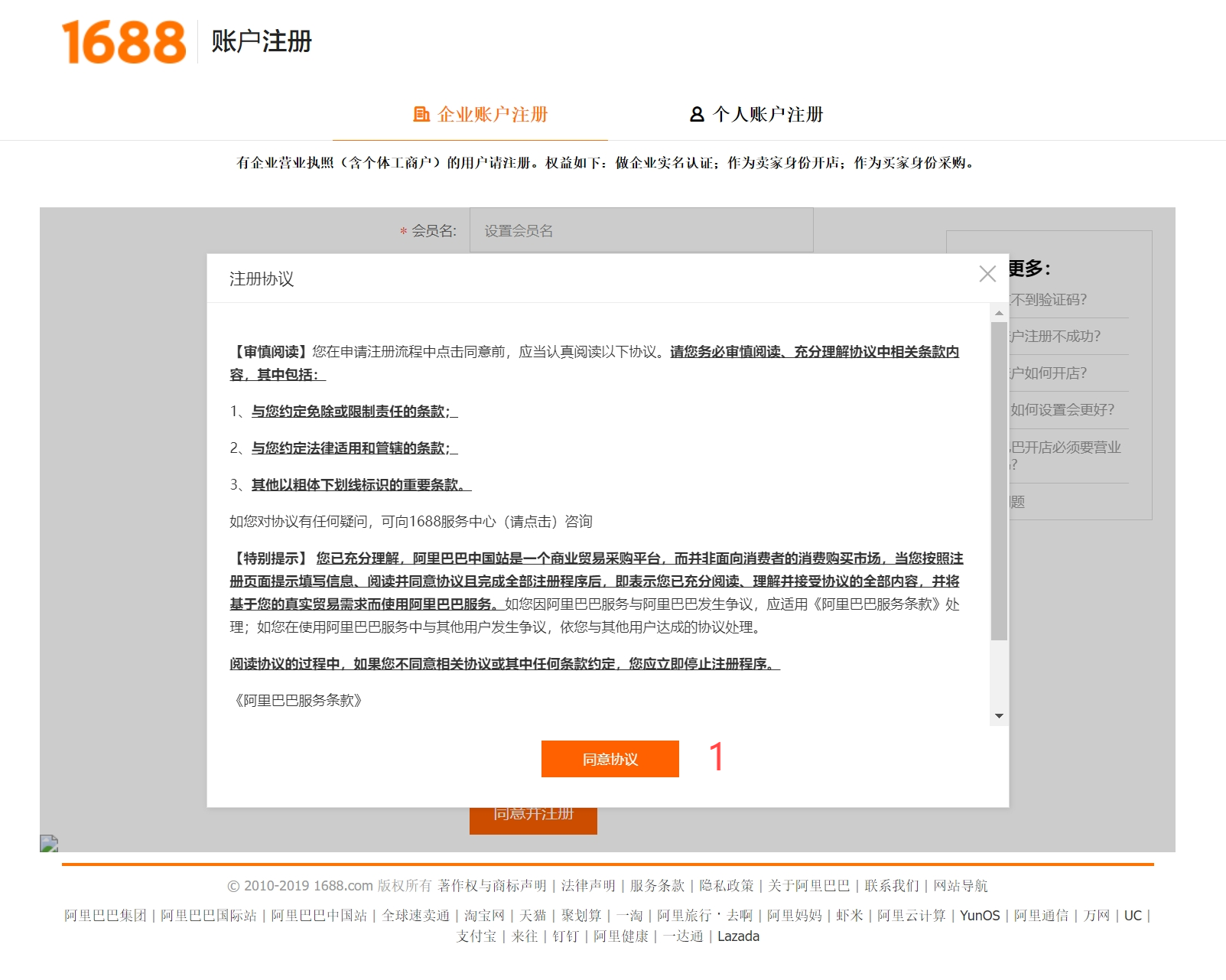
A user registration agreement will then pop up. Click the red button at the bottom of the window (Label.1) to agree to the terms of the agreement.
Step 2: Fill in Account Information
Next, it's time to fill in your account information. I have marked all the areas that need explanation with red labels (Label.2 – Label.10).
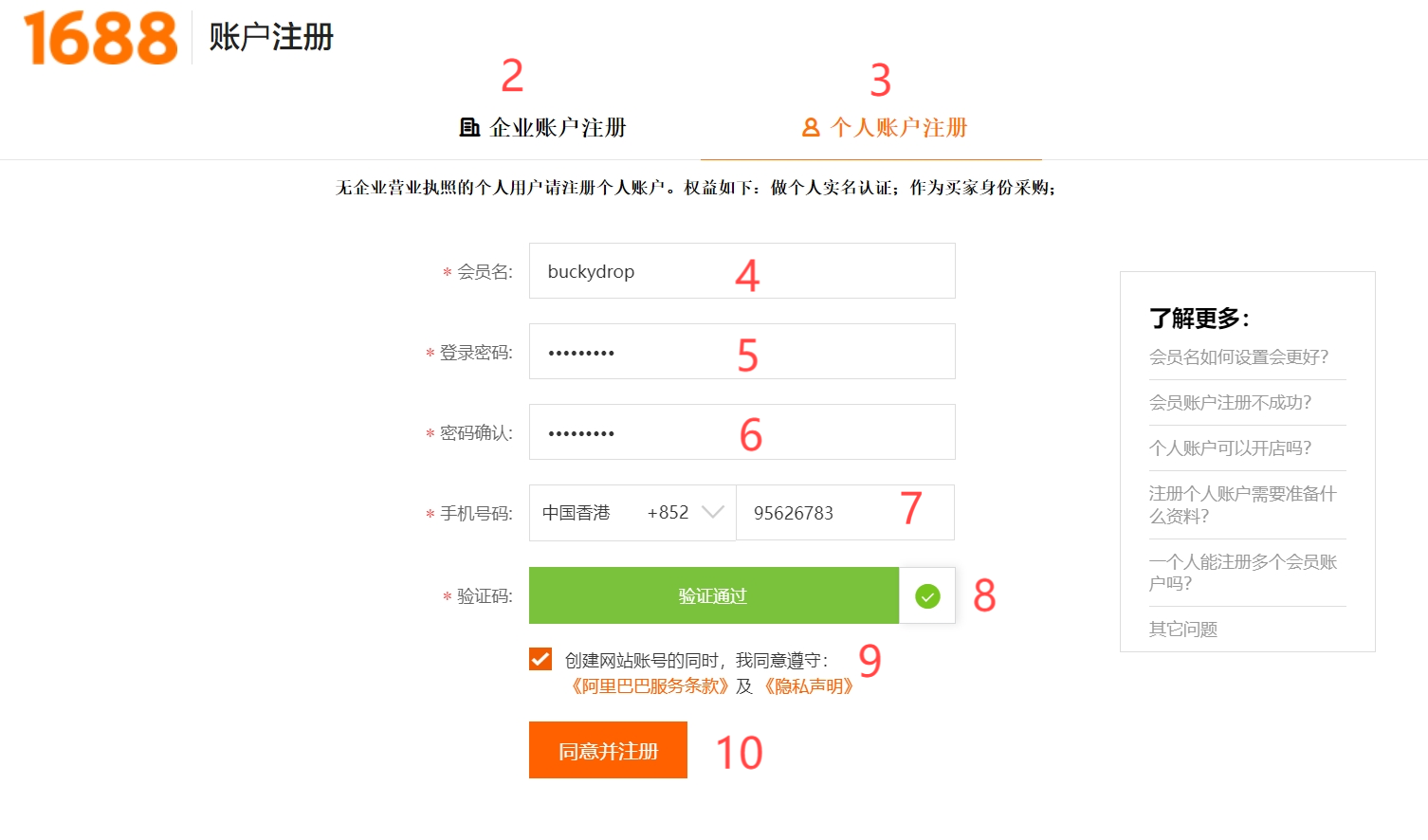
Then I'll explain each label.
Label.2 and Label.3
These two labels allow you to choose between a company or personal account. If you just want to purchase as a foreign individual, you must select Label.3, which means a personal account.
| Account Type |
Registration Requirements |
Payment & Capital Limits |
Risk Level (Ban/Shadowban) |
Sourcing Strategy for E-commerce |
|---|---|---|---|---|
| Individual Account | Overseas Phone Number + Personal Alipay | High (Single & daily volume capped by foreign cards) | High Risk (Frequent IP switches easily trigger security bans) | Best for initial product hunting, sample testing, or using a sourcing agent. |
| Business Account | Chinese Business License + Corporate Alipay | Low (Supports large corporate wire transfers & supplier credit) | Minimal Risk (Backed by platform-verified commercial credentials) | Best for scaled merchants needing direct factory contracts and volume. |
Label.4
● Here, you fill in your login name. Please note the following:The name length must be between 5-25 characters.
● The login name can only be set once, and once it's set, it cannot be changed.
Label.5
● This is where you set your password. Here are some requirements for setting the password:6-20 characters long, and the password cannot be the same as your username.
● It can only contain letters, numbers, and punctuation marks.
● It must include at least 2 types of characters from letters, numbers, and punctuation marks.
Label.6
Re-enter the previously entered password.
Label.7
Here, select your country/region and phone number. Make sure your phone can receive SMS messages from China because you will receive a verification code via SMS in the next step.
Label.8
This is to verify that you are not a robot. Simply drag the verification box from left to right to complete the process.
Label.9
Check this box to agree to some of their statements and agreements.
Label.10
Click the "Agree and Register" button to proceed to the next step.
Step 3: Fill in the SMS Verification Code
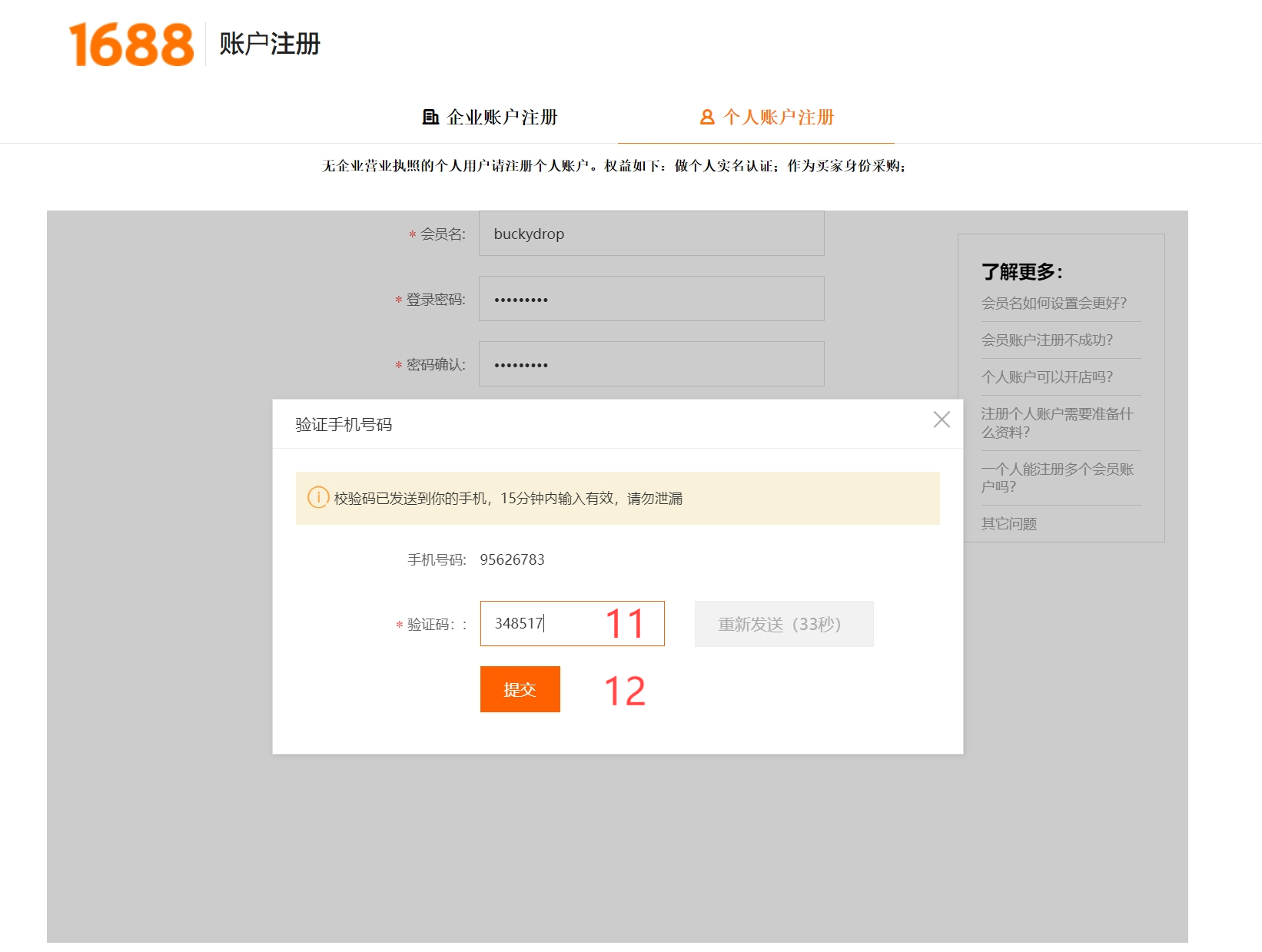
Next, a page will pop up asking you to enter the SMS code (Label.11).
Enter the code and then click "Submit" (Label.12).
If everything goes smoothly, your account will be registered.
Step 4: Complete Your Account Profile (Optional)
On the next page, 1688.com will ask you to complete your account profile. This step is entirely optional.
If you choose to fill out this profile, you don't need to complete every option—just fill in the areas marked in red.
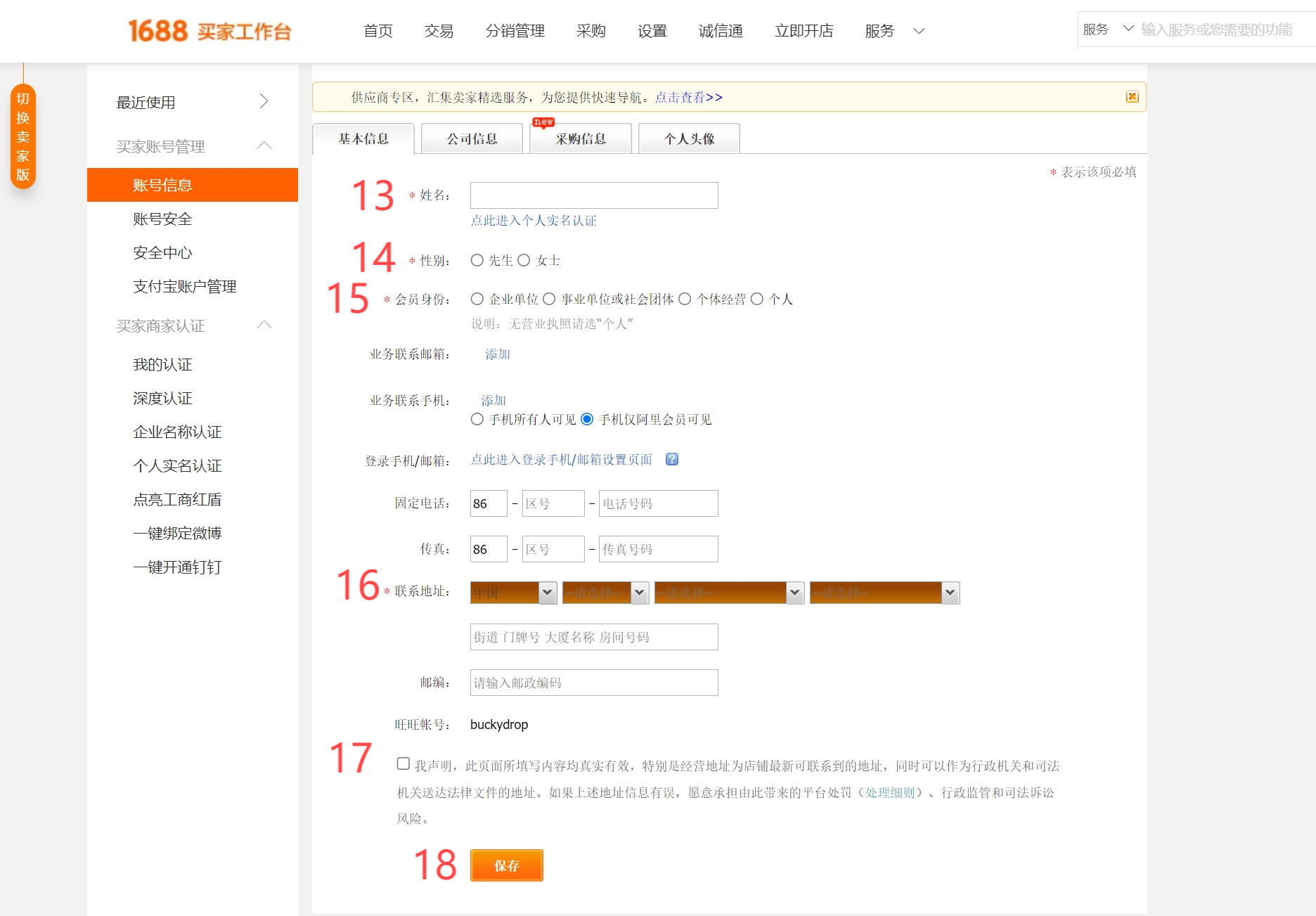
Label.13
Enter your real name here.
Label.14
Select your gender.
Label.15
Choose your membership type here. For foreigners, it's best to choose the last option, "Individual."
Label.16
Fill in your contact address.
Label.17
Check the box to acknowledge the statement.
Label.18
Click the orange button to save the information.
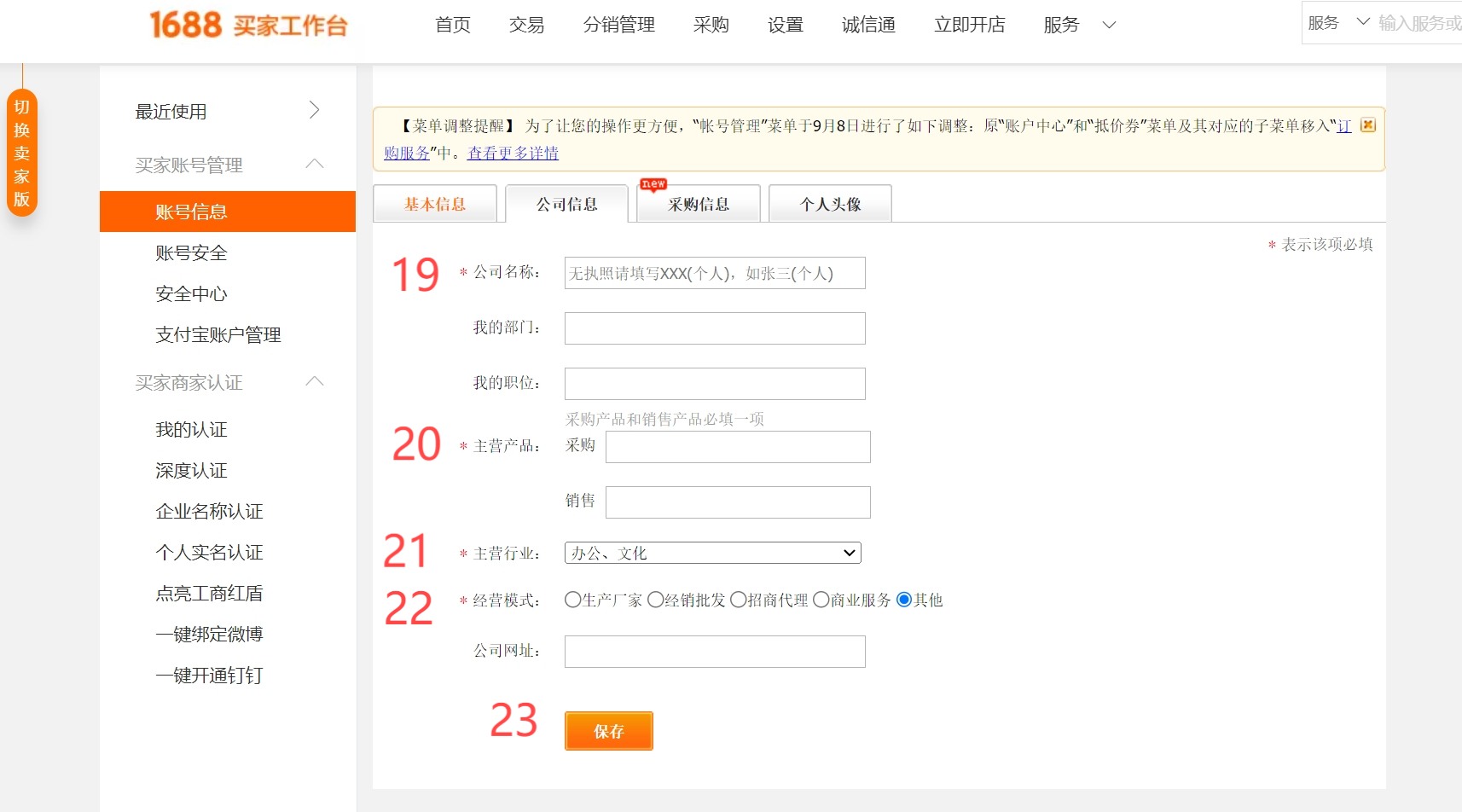
Label.19
Fill in your company name.
Label.20
Enter your main products.
Label.21
Specify your primary industry.
Label.22
Describe your business model.
Label.23
Click the orange button to save the information.
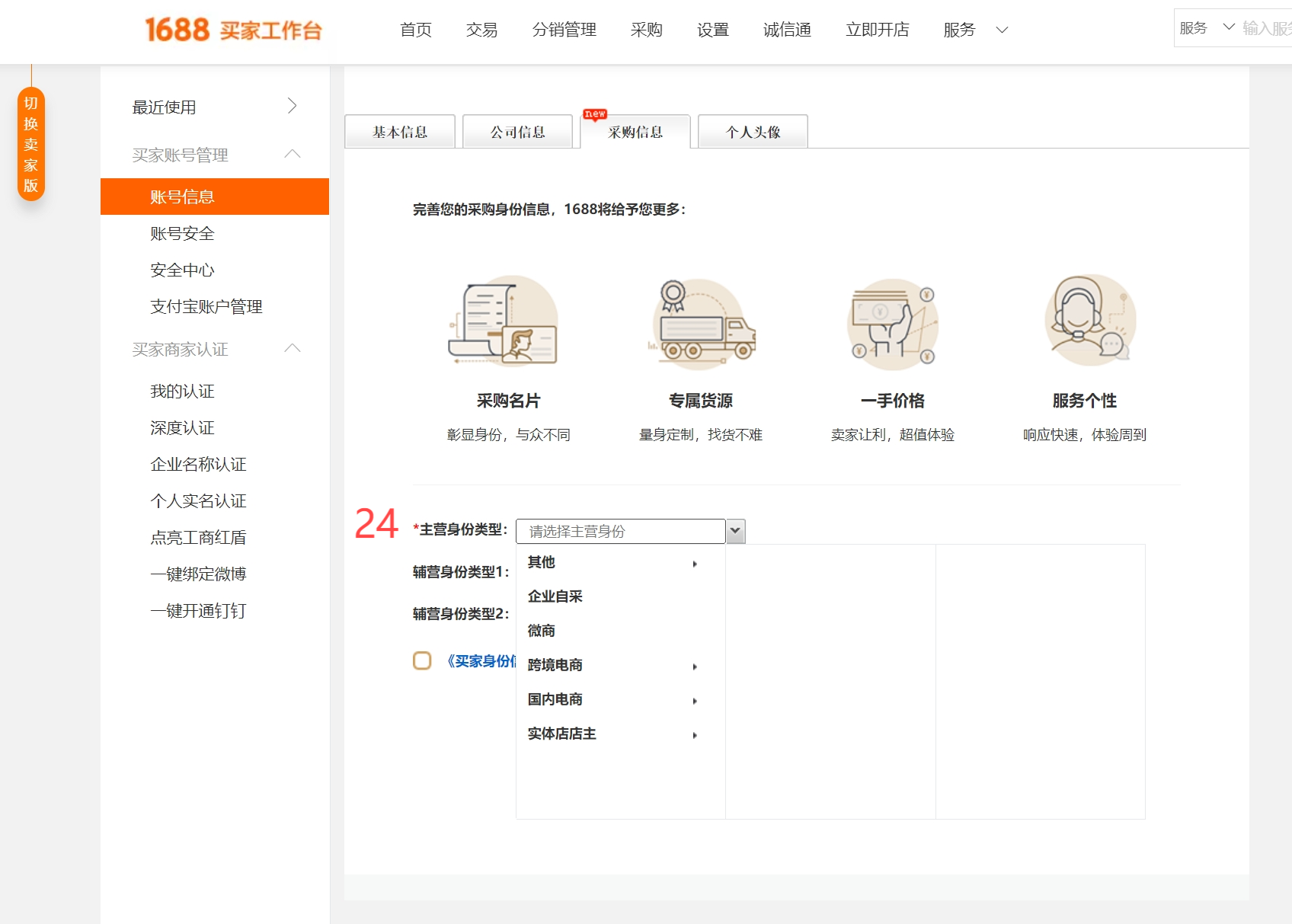
Label.24
Select your primary business identity type. It is recommended to choose "Cross-border E-commerce."
Step 5: Update or Add Your Account Information
For your account security, you can also add or update your 1688 account information in the User Center.
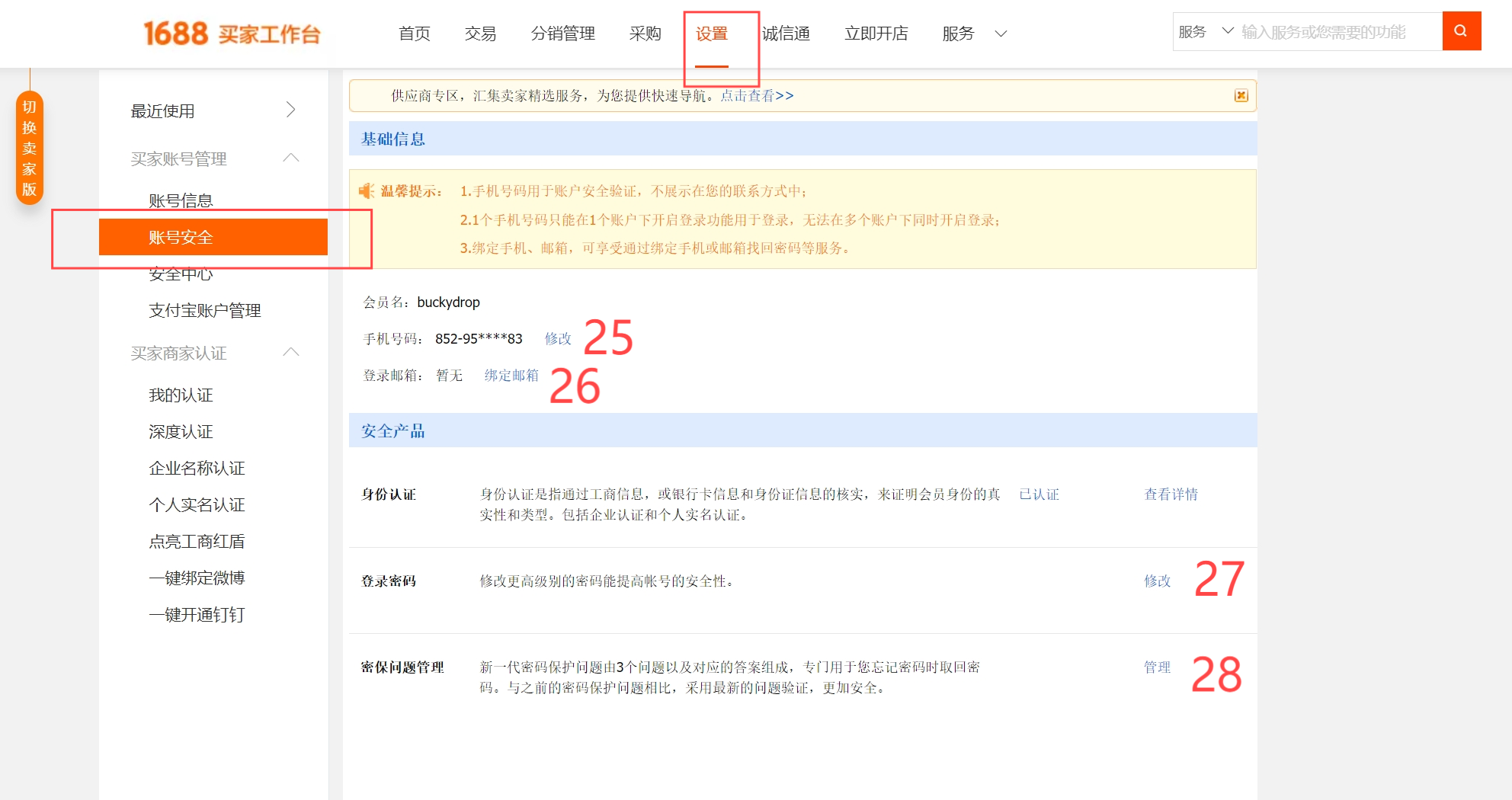
Label.25
Use this option to modify your phone number.
Label.26
You can add your email address here.
Label.27
This is for changing your login password.
Label.28
This is for adding and managing security questions. Adding answers to security questions helps further protect your account from unauthorized use.
Step 6: Congratulations! Your new 1688.com account is now ready!
If you’ve followed the steps above, congratulations! You now have a fully activated 1688 account.
1688 Account Preservation & Payment FAQ Section
Q1: Why was my newly registered 1688 account randomly frozen or restricted from logging in?
A: 1688 runs an aggressive anti-fraud algorithm. For foreign users, triggering an automatic security ban usually happens due to fluctuating IP addresses via active VPN toggles, logging into multiple profiles on the exact same device, or spamming generic inquiries to dozens of factory suppliers immediately upon signup.
Q2: What should I do if the system fails to deliver the SMS verification code to my overseas phone?
A: Ensure your carrier doesn't block international incoming texts and omit any leading "0" before your standard mobile number. If the issue persists, the ultimate workaround is to register and verify an "Alipay" or "Taobao" account first, then use the "1-Click Login via Taobao/Alipay" button on 1688 to bypass the registration friction entirely.
Q3: Why is direct purchasing on 1688 still highly inefficient for international stores even after successful registration?
A: 1688 is strictly a domestic wholesale directory. It does not natively support global credit cards, and checking out via international cards on Alipay incurs a mandatory 3% processing fee alongside unfavorable conversion rates. Moreover, individual factories cannot manage consolidated overseas logistics or process global returns. The smartest strategy is to use your 1688 account solely for product discovery, while routing all ordering, multi-supplier payments, warehouse quality checks, and international fulfillment through a single dashboard like BuckyDrop.
3. Streamline Your Procurement Process with BuckyDrop
Now that you’ve successfully registered and activated your 1688 account, you can start browsing and purchasing the products you need. However, many people encounter challenges such as language barriers, payment methods, and logistics when sourcing directly from 1688. This is where BuckyDrop can be your ideal partner.
With BuckyDrop, you can easily add products from 1688 to your procurement list. We will assist you with the entire process, from placing orders and making payments to quality inspection and logistics. Whether it's a diverse range of products or complex international shipping, BuckyDrop offers a more convenient procurement experience.
By using BuckyDrop, you don’t have to worry about language barriers or cumbersome payment processes. Simply submit your 1688 product links to us, and we will handle everything efficiently, allowing you to focus on other important aspects of your business. Click BuckyDrop to learn more about how BuckyDrop can simplify your cross-border e-commerce process.
Real Case Study: Eliminating 1688 Registry Risks and Achieving Zero-Friction Sourcing
“In pursuit of direct factory pricing, our team initially insisted on managing our own 1688 wholesale profiles. However, due to routine VPN network hops, our purchasing profile was flagged by security filters and permanently frozen right before a major holiday sale. Our pending balances were locked, dozens of custom factory orders vanished overnight, and our store faced a massive inventory crisis. To make matters worse, sourcing directly without an on-the-ground warehouse meant we frequently received defective units with absolutely no viable way to return them back to rural China from overseas.
In a state of panic, we migrated our entire catalog links directly into BuckyDrop. The shift was night and day: we no longer had to stress over unstable 1688 account bans, and our complex cross-border B2B payments, multi-supplier bundling, and meticulous Quality Control (QC) became fully automated. If a factory slips up, BuckyDrop’s domestic team intercepts and handles the domestic exchange instantly—dropping our customer refund rates from 14% to under 1%. Leaving backend operations to a dedicated commercial fulfillment network is the only true way to scale an e-commerce brand.”
Learn More
➜ BuckyDrop Website
➜ BuckyDrop Blog
➜ Contact Us: marketing@buckydrop.com