How to Use Google Trends to Find Dropshipping Products Before They Go Viral
Google Trends can help you catch demand signals earlier, but it should not be treated like a product-prediction machine. The job is simple: use search-interest movement to decide what deserves a small test, then let sourcing, fulfillment, tracking, and customer feedback decide whether the product can scale.
This guide explains how to use Google Trends to find dropshipping products before they become crowded, and how to validate those products for a real Shopify or WooCommerce store serving customers in the United States, Canada, or the broader North American market.
If you are still setting up your first store, this guide on the best way to start dropshipping may be a better starting point before you begin trend hunting.
Quick Verdict
Google Trends can help you find early dropshipping product signals, but it cannot prove that a product will sell profitably.
Use it to compare search interest, identify seasonality, check regional demand, and find rising related queries. Then validate the product with supplier checks, SKU and variant accuracy, shipping route review, tracking return, product quality, packaging needs, and a 10–20 order test before increasing ad spend.
For dropshipping sellers, “Is it trending?” is the wrong finish line. The better question is:
Is this product worth testing, and can my fulfillment workflow support the customer experience I am about to advertise?
What Google Trends Can and Cannot Tell You
Google Trends shows relative search interest. It does not show exact monthly search volume, sales volume, conversion rate, average order value, refund risk, or supplier reliability.
Google explains that Trends data is normalized by time and location, so a score of 100 represents peak relative interest for the selected query, region, and period—not absolute search volume. See Google’s FAQ about Trends data.
That distinction matters for dropshipping. A rising chart can tell you people are searching. It cannot tell you whether customers will tolerate the delivery promise, whether the product photos match the actual item, or whether your landed cost leaves room for paid traffic.
Google Trends can help you see | Google Trends cannot confirm |
Search interest over time | Actual sales volume |
Regional interest by country, state, or metro | Profit margin after fulfillment |
Related rising queries | Supplier reliability |
Seasonality | Product quality |
Keyword comparison | Return rate or chargeback risk |
Breakout search behavior | Whether ads will convert profitably |
Use Google Trends near the top of the product research funnel. It should help you decide what deserves more investigation, not what deserves a large ad budget tomorrow.
A Practical North American Ecommerce Scenario
Assume you run a small Shopify or WooCommerce store selling to customers in the United States and Canada. You do not want to buy bulk inventory yet. You are testing products through dropshipping, possibly sourcing from China, and you care about three things.
First, you want to spot demand before every competitor is running the same product ad.
Second, you want enough confidence to test 10 to 20 real orders without creating fulfillment chaos.
Third, you need the product to work operationally: clear variants, reliable supplier stock, reasonable shipping communication, acceptable product quality, and tracking that returns to your store quickly enough to reduce support tickets.
North American customers are used to checking USPS, UPS, FedEx, or local carrier tracking soon after purchase. If tracking does not return in a reasonable early window, “Where is my order?” tickets can arrive before the product has even left the supplier workflow.
This is where Google Trends fits. It helps you narrow down the product idea. Your sourcing and fulfillment workflow decides whether the product can survive real customers.
Tools and Inputs You Need Before Starting

Do not start by typing random supplier catalog items into Trends and calling the highest line a winner.
Start with a working list of product hypotheses. These can come from supplier catalogs, TikTok comments, customer support questions, Amazon review complaints, Reddit threads, niche forums, seasonal calendars, or products already getting traction in adjacent markets.
You need:
· 5 to 10 product ideas or product angles
· A target market, such as the United States, Canada, or North America
· Two or three keyword variations for each product
· A rough idea of supplier cost, shipping method, and product size
· A storefront platform, usually Shopify or WooCommerce
· A simple test budget and a limit on order volume before scaling
Shopify describes dropshipping as a model where sellers sell products without storing or shipping inventory themselves, with suppliers shipping products to customers on the seller’s behalf. See Shopify’s official guide: What is dropshipping?.
After Google Trends helps you narrow the idea, use product sourcing tools to check supplier stability, product availability, variant clarity, fulfillment risk, and whether the item can be tested without adding too much manual work.
Step-by-Step Workflow for Dropshipping Product Research
Step 1: Start With Product Hypotheses, Not Random Keywords
A useful product hypothesis ties the item to a customer problem, a buying moment, or a recurring use case.
Weak hypothesis:
“LED pet collar is trending.”
Better hypothesis:
“Dog owners in colder northern states may search more for LED pet collars during darker months because evening walks happen after sunset.”
The second version gives you something to test. You can check seasonality, region, related queries, timing, and product-page positioning. It also helps you think about safety, visibility, battery life, sizing, waterproofing, and delivery expectations.
For each product, write down the product term, problem term, and audience term.
Product term | Problem term | Audience term |
LED dog collar | night dog walking | dog owners |
portable blender | protein shake travel | gym commuters |
heated gloves | cold hands winter | outdoor workers |
travel jewelry case | tangled necklaces | frequent travelers |
This gives you more than one way to read demand.
Step 2: Set the Correct Market and Time Range
If you sell to North America, do not rely only on worldwide data. A product can look strong globally but weak in the United States or Canada.
In Google Trends, change the location to your target market. If you sell mostly to U.S. customers, start with United States. If you sell into Canada, check Canada separately. If your ad account targets both markets, compare them before deciding where to launch first.
Google’s regional interest guide explains how Google Trends shows interest by location.
For time range, check at least two windows:
· Past 12 months: useful for recent movement and near-term seasonality
· Past 5 years: useful for seeing whether the product spikes every year or is genuinely emerging
If a product spikes every November, it may still be a good seasonal product. But you should not call it “going viral” if it follows the same pattern every Q4.
Step 3: Check Whether Interest Is Rising, Flat, Seasonal, or Spiking
Most product charts fall into one of four patterns.
A steady upward trend is often the most interesting. It may suggest growing awareness over time, though you still need to verify competition, margin, and fulfillment.
A flat trend may still work if the product solves a stable problem. Not every profitable product goes viral.
A seasonal trend can work if you prepare early. Think winter accessories, back-to-school storage, Mother’s Day gifts, patio products, Halloween items, and Black Friday / Cyber Monday giftable products.
A single spike is the most dangerous. It may come from a news story, influencer mention, meme, or one-off event. If supplier processing and international delivery take longer than the demand window, a short-lived spike can fade before customers receive the product. Verify processing time, shipping route, tracking availability, and delivery estimates before scaling.
Do not scale a product from one spike alone.
Step 4: Compare Multiple Product Keywords
Google Trends lets you compare search terms, which is more useful than checking one keyword in isolation. Google explains how comparison works in its Google Trends comparison help.
Instead of checking only “travel jewelry case,” compare:
· travel jewelry case
· jewelry organizer travel
· necklace travel case
· small jewelry box
· anti-tangle necklace organizer
You are not only looking for the highest line. You are looking for the clearest buyer language.
A search like “travel jewelry case” may indicate product awareness. A search like “how to keep necklaces from tangling while traveling” may reveal the pain point your product page should address.
This is where many sellers miss the opportunity. They chase the product name, while the profitable ad angle may sit inside the related problem query.
Step 5: Use Related Queries to Find Early Product Angles
Related queries are one of the most useful parts of Google Trends for dropshipping.
Google’s related searches help page explains rising and breakout queries. A breakout query can indicate rapid search-interest growth, but it should still be validated carefully because rapid growth can come from a very low starting point.
Look for three types of related queries.
The first is use-case language: “for camping,” “for dorm room,” “for small apartment,” “for elderly parents,” or “for travel.”
The second is attribute language: “waterproof,” “portable,” “foldable,” “rechargeable,” “non toxic,” “quiet,” or “machine washable.”
The third is audience language: “for dogs,” “for teachers,” “for runners,” “for new moms,” or “for truck drivers.”
When related queries reveal the buyer, use case, and must-have attribute, your test gets much easier to build. You have better ad creative, sharper landing-page copy, clearer SKU selection, and better supplier questions.
Step 6: Separate Seasonal Trends From Emerging Trends
Seasonal products are not bad. Misreading them is bad.
For North American ecommerce sellers, seasonal timing affects cash flow, ad performance, shipping expectations, and support workload. A product that peaks in late November may need to be sourced and tested months earlier, not during Black Friday week.
Use the five-year view to check whether the same pattern repeats. If it does, plan the test before the season.
For example:
· Test winter accessories before the first cold-weather spike
· Test dorm and storage products before back-to-school demand
· Test outdoor products before spring search interest rises
· Test giftable products before Q4 peak season
A product that rises outside its normal seasonal window deserves closer attention. That may signal a new use case, social media exposure, or changing buyer behavior.
Step 7: Check Regional Demand in North America
Regional demand should change more than your Meta targeting.
If demand is strongest in northern U.S. states or Canada, your product copy, shipping promise, and support prep should reflect that. If demand is stronger in dense metro areas, apartment size, portability, and storage may matter more.
Regional interest can also affect customer expectations. U.S. and Canadian customers often expect visible tracking shortly after purchase. Before scaling, check how quickly tracking returns to the store, whether the carrier page updates cleanly, and whether your support team can explain the shipping stage without manually chasing the supplier.
Do not promise a delivery experience your sourcing route has not proven in a small test.
Step 8: Validate the Trend Outside Google Trends
A Google Trends signal is only the first gate. Before adding the product to your store, move from trend discovery into drop sourcing: supplier checks, product cost, SKU and variant matching, inventory visibility, QC requirements, and shipping route review.
Check whether suppliers have consistent SKU and variant data. Look for product photos that match the actual item. Ask whether inventory updates are reliable. Confirm available shipping options, tracking availability, return handling, and packaging needs.
Then check the demand side. Are competitors already running ads? Are Amazon reviews revealing complaints you can address? Are TikTok comments asking “Where can I buy this?” or are they only reacting to entertainment content? Is the product likely to trigger refund pressure because it looks better in video than in real life?
For sellers testing products through Chinese supply channels, this guide to dropshipping from China can support the next layer of research after Google Trends.
For Shopify and WooCommerce sellers, the operational test matters as much as the trend test. WooCommerce’s official dropshipping documentation describes a workflow where dropshipping partners can ship orders to customers. See WooCommerce Dropshipping Documentation.
Manual Test vs. Fulfillment Workflow

Early product testing can be manual. Scaling manual work is where sellers get hurt.
Stage | Manual Product Test | Sourcing / Fulfillment Workflow Test |
Order volume | 1–5 sample or trial orders | 10–20 real customer orders |
Main goal | Check product interest and basic supplier response | Check whether the workflow can support live customers |
What to watch | Product quality, supplier reply, item accuracy | Order sync, SKU matching, tracking return, QC, packaging, exceptions |
Main risk | Bad product choice | Support tickets, refunds, wrong variants, out-of-stock handling |
Decision | Keep researching or run a small test | Scale, pause, or replace supplier/workflow |
A product can pass Google Trends and still fail operationally. That is why your first real test should measure more than clicks and add-to-carts. It should measure fulfillment friction.
Example Workflow: Evaluating a Potential Dropshipping Product
This is an example scenario, not a customer case.
Suppose you are considering a compact electric lint remover for the U.S. and Canadian markets. It is small, visually demonstrable, and relevant to fashion, travel, and home care.
You open Google Trends and compare:
· electric lint remover
· fabric shaver
· sweater shaver
· lint remover for clothes
The five-year view shows whether demand rises every winter. The 12-month view shows whether interest is currently building. Related queries may reveal product angles such as “for couch,” “for wool coat,” “portable,” or “rechargeable.”
If the chart shows recurring winter demand, treat it as a seasonal product and test before peak season. If related queries around “rechargeable fabric shaver” are rising, check suppliers for battery type, charging cable, packaging, product photos, safety labeling, and variant clarity.
Before launching ads, order samples or test a small number of real orders. For the first 10 to 20 orders, measure:
· Time from order sync to supplier processing
· Whether the correct SKU and variant are fulfilled
· Tracking return speed
· Customer questions before delivery
· Product quality complaints
· Refund or replacement requests
· Real cost per fulfilled order
If those numbers look acceptable, then you can increase ad spend. If not, the trend may be real, but your offer is not ready.
Trend Quality Checklist for Dropshipping Sellers
Use this checklist before moving a product from “interesting” to “ready to test.”
Question | Why it matters |
Is interest rising across more than one time window? | Reduces the risk of reacting to one spike |
Is the trend regional enough to target? | Helps with ad spend and landing-page positioning |
Are related queries showing use cases or buyer problems? | Gives you stronger product-page copy |
Is the product seasonal? | Helps you test before demand peaks |
Can suppliers provide stable variants and inventory? | Prevents fulfillment exceptions |
Is shipping communication acceptable for the buyer expectation? | Reduces refund pressure |
Does the product need branded packaging or quality inspection? | Important for fashion, gifts, beauty, and fragile goods |
Can you test 10 to 20 orders before scaling? | Keeps early mistakes affordable |
Do you know the real cost per fulfilled order? | Protects margin after shipping and service costs |
Common Mistakes When Using Google Trends for Dropshipping
The first mistake is treating search interest as purchase intent. Someone searching a product may be curious, researching, comparing, or reacting to a viral post. That does not mean they will buy from your store.
The second mistake is ignoring low-volume noise. Google notes that Trends data can include statistical noise, especially for low-volume searches. That is another reason to validate with other signals before committing.
The third mistake is using global data for a North American store. If you sell mostly to U.S. and Canadian customers, your trend read should match those markets.
The fourth mistake is scaling before fulfillment is stable. A product can look great in Google Trends and still fail because of out-of-stock handling, poor tracking return, inaccurate variants, or slow support resolution.
The fifth mistake is copying a viral product without finding a better angle. If everyone is selling the same item with the same video, your margin can get squeezed by ad costs. Related queries can help you find a narrower use case or a different customer segment.
Where BuckyDrop Fits
Once a product passes the Google Trends screen, the question changes. You are no longer asking, “Is there interest?” You are asking, “Can I actually fulfill this without creating support problems?”
This is where sourcing and fulfillment infrastructure matters.
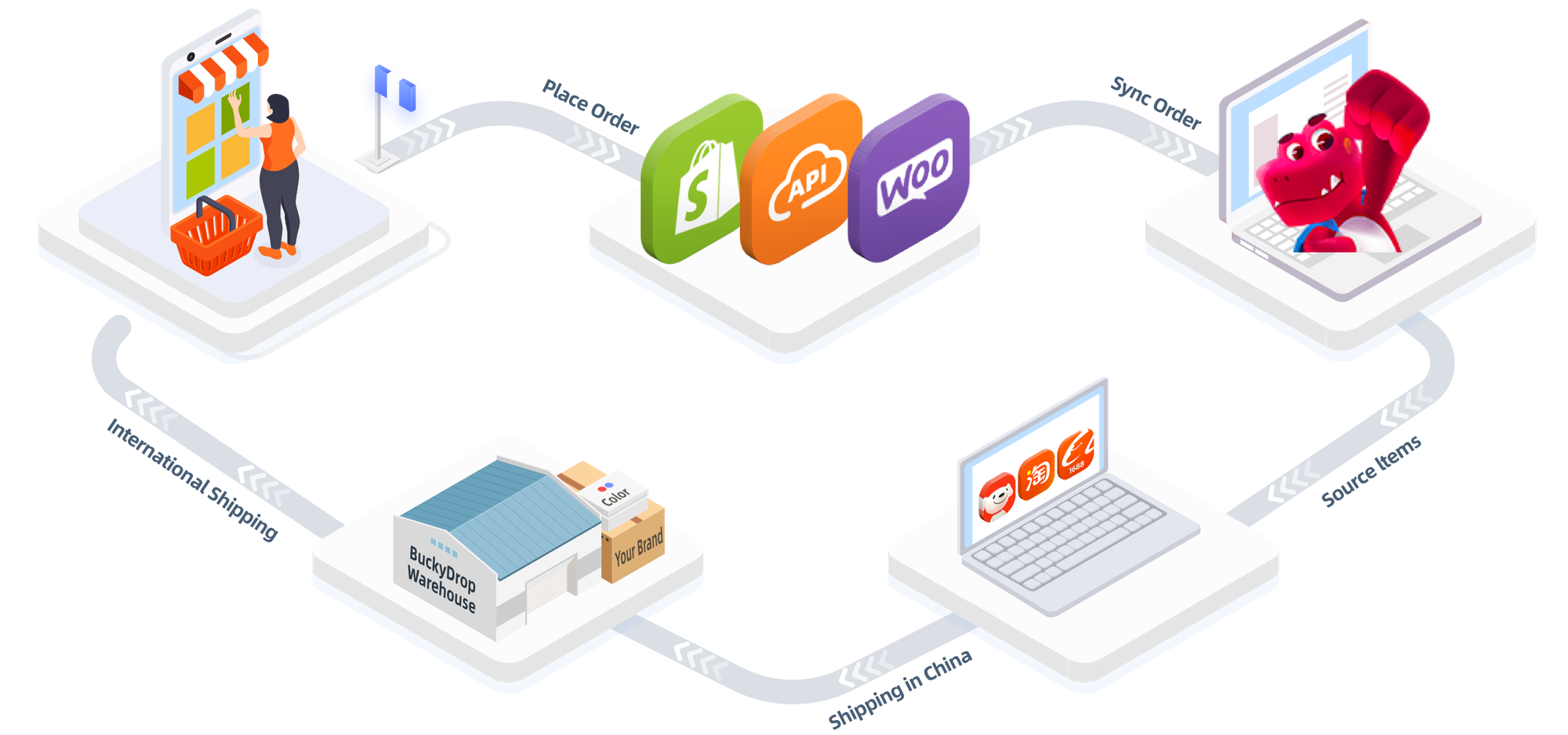
According to company-provided materials, BuckyDrop is positioned as a China sourcing, automated fulfillment, and branded dropshipping platform for Shopify, WooCommerce, BuckyShop, and API-connected merchants. The same materials describe sourcing from Chinese ecommerce platforms, order sync, inventory updates, logistics tracking sync, warehouse handling, quality inspection, package processing, and branded packaging services. Source: company-provided BuckyDrop overview materials.
BuckyDrop also has a public Shopify App Store listing and a public WooCommerce plugin page, which are useful references for platform-compatibility checks.
For sellers who need sourcing, store connection, product handling, and fulfillment support after a product passes validation, BuckyDrop dropshipping services can be evaluated as part of the operational test. Verify current pricing, supported routes, onboarding steps, service boundaries, packaging requirements, and support scope before scaling.
If you are comparing dropshipping platforms, do not only compare feature lists. Compare what happens after the order arrives: whether inventory updates cleanly, whether SKU and variant matching works, how tracking returns to the store, and how exceptions are handled.
Who BuckyDrop Is Best For

BuckyDrop is most relevant for sellers who already have a product idea worth testing and need to check whether sourcing and fulfillment can support real orders.
It may fit:
· Shopify sellers testing products sourced from China
· WooCommerce sellers who need a sourcing-to-fulfillment workflow
· Dropshipping sellers moving from random product tests toward branded dropshipping
· Small ecommerce teams that want to reduce manual supplier communication
· Sellers who need quality inspection, packaging options, or branded inserts
· Teams that need API-connected workflows and should verify the current API scope before implementation
The best time to evaluate an all in one dropshipping platform is not when you are still guessing product ideas. It is after the product has passed the search-interest screen and you need to test whether the operational workflow can handle real customers.
Who BuckyDrop Is Not For
BuckyDrop may not be necessary if you are still only researching product ideas, testing one or two manual orders, selling digital products, working with a local supplier that already handles fulfillment cleanly, or not ready to process live customer orders.
It is also not a replacement for product-market validation. If the product has weak demand, poor margins, high refund risk, or a low-quality supplier, better fulfillment software will not fix the offer.
Use Google Trends to decide what deserves a test. Use sourcing and fulfillment tools to decide whether the test can operate without breaking customer trust.
What to Verify Before You Commit
Before moving a product into a sourcing or fulfillment workflow, verify the basics with real orders, not assumptions.
Check whether the supplier can provide stable SKU and variant data. Confirm whether inventory updates are reliable. Compare supplier photos with the actual item. Test whether tracking returns to your store quickly enough to reduce support tickets. Review packaging requirements, quality inspection scope, return handling, and the real cost per fulfilled order.
If you are selling to U.S. or Canadian customers, test whether the tracking page and delivery communication meet the expectations created by your product page and ads. A good ad can create demand. A weak fulfillment workflow can turn that demand into refunds, disputes, and support backlog.
FAQ
Is Google Trends enough to choose dropshipping products?
No. Google Trends is useful for spotting search interest, seasonality, regional demand, and related queries. It does not confirm sales volume, conversion rate, product quality, supplier reliability, shipping cost, or return risk. Use it as the first filter, then validate with supplier checks, competitor research, ad tests, and 10 to 20 real orders.
How early can Google Trends show a product trend?
It depends on the product and query. Some rising queries appear before a product becomes mainstream, especially when people start searching for a problem or use case before they know the exact product name. But Google Trends is not a guaranteed early-warning system. Validate breakout queries carefully because rapid growth can also come from low starting volume or short-lived media attention.
What time range should I use for dropshipping research?
Use at least two views. The past 12 months helps you understand current movement. The past 5 years helps you detect seasonality and repeated Q4 or holiday spikes. For products tied to weather, school, gifts, or events, the longer view is essential.
Should Shopify and WooCommerce sellers use Google Trends differently?
The trend-research logic is similar, but the workflow after validation may differ. Shopify sellers may prioritize app-based order sync, product import, and fulfillment automation. WooCommerce sellers may need to check plugin compatibility, hosting performance, checkout setup, and how order data passes into their fulfillment workflow. Always test SKU and variant matching before scaling.
Can Google Trends predict viral products?
No. It can show rising search interest and related queries, but it cannot predict virality with certainty. A product can go viral and still be unprofitable if ad costs rise, shipping communication is weak, product quality is poor, or refund pressure is high.
What should I check before adding a trending product to my store?
Check supplier reliability, product photos, SKU and variant accuracy, inventory update process, available shipping routes, tracking availability, packaging requirements, return handling, and landed cost. Then run a small test before increasing ad spend.
When should I use a fulfillment platform instead of manual fulfillment?
Manual fulfillment can work for a small test. Consider a sourcing and fulfillment workflow when order volume, SKU complexity, supplier communication, inventory updates, tracking uploads, or customer questions start taking time away from marketing and support. Test the workflow with 10 to 20 orders before moving a larger campaign into it.
What should I test before connecting a fulfillment provider?
Test SKU and variant matching, product accuracy, inventory updates, order sync, tracking return, support response process, packaging requirements, and real cost per fulfilled order. If branded packaging, QC, or special handling matters, verify what is included and what may cost extra before scaling.
Does BuckyDrop publish fixed pricing for every product and route?
Pricing may vary by product category, packaging requirement, destination, shipping line, service scope, and store workflow. Verify current pricing, route availability, onboarding steps, and service limits directly through BuckyDrop before scaling.
Final Recommendation
Google Trends will not hand you a winning product. It can keep you from guessing in the dark.
Use it to decide which product ideas deserve a real test. Compare search interest, check seasonality, study related queries, review North American regional demand, and avoid scaling from a single spike.
Then let fulfillment data decide whether the product can grow. Measure SKU accuracy, tracking return, supplier reliability, support tickets, refund pressure, and real cost per fulfilled order.
If your next product passes the Google Trends screen, test it with real orders before scaling. Connect your store through BuckyDrop dropshipping services and run your next 10 to 20 orders through the workflow. Measure manual work removed, SKU and variant accuracy, tracking return, fulfillment exceptions, support tickets, and real cost per fulfilled order. Scale only if the operational data still supports the trend.
Sources
· Google’s FAQ about Trends data
· Google Trends regional interest guide
· Google Trends related searches help page
· Google Trends comparison help
· Shopify Help Center: What is dropshipping?
· WooCommerce Dropshipping Documentation
· BuckyDrop Shopify App Store listing
· BuckyDrop WooCommerce plugin page
· Source: company-provided BuckyDrop overview materials.