Shopify vs WooCommerce vs BigCommerce for Dropshipping in 2026

Quick Verdict
For a nontechnical founder using a supplier with a maintained Shopify integration, Shopify may be the first platform worth testing. Hosting, TLS/SSL, core platform maintenance, and the store administration environment are included in the subscription. The tradeoff is dependence on apps and the recurring cost of the final app stack.
WooCommerce is better suited to merchants who already have WordPress expertise or dependable technical support. The core platform is open source, but the merchant remains responsible for hosting choices, backups, updates, extension compatibility, performance, and recovery procedures.
BigCommerce belongs on the shortlist when a merchant wants hosted infrastructure and needs to test whether the functions included in a current plan reduce reliance on specific third-party apps. Its 2026 GMV thresholds and payment-provider fee rules need to be modeled against actual sales and gateway usage.
These are editorial recommendations based on the operating models described below. They are not universal platform rankings.
Related reading: Use a documented workflow and cost model—not brand familiarity alone—to identify the best platform for dropshipping.
Side-by-Side Comparison
Decision factor | Shopify | WooCommerce | BigCommerce |
Hosting model | Hosted SaaS | Self-hosted or managed WordPress hosting | Hosted SaaS |
Core maintenance | Managed by Shopify | Merchant, host, or development partner | Managed by BigCommerce |
Typical launch complexity | Lower when standard apps and themes meet the requirements | Depends heavily on hosting, theme, extensions, and technical support | Moderate; requirements should be checked against the selected plan |
Dropshipping workflow | Usually handled through apps or fulfillment-service connections | Usually handled through extensions, supplier systems, or custom integrations | Usually handled through marketplace apps, APIs, or custom integrations |
Customization | Controlled platform environment | High code, hosting, and data control | Hosted platform with API and app options |
Main hidden cost | Multiple recurring app subscriptions | Hosting, extensions, maintenance, and developer time | GMV thresholds, plan upgrades, apps, and payment-provider rules |
Best first fit | Nontechnical or small teams prioritizing lower infrastructure work | WordPress operators and technically supported teams | Merchants evaluating hosted commerce for more complex requirements |
Main risk to test | App dependency and total software cost | Maintenance ownership and plugin conflicts | Plan economics and integration fit |
How We Compare the Platforms
Before comparing feature counts, map one order from checkout to delivery.
At minimum, document:
· How store SKUs and supplier SKUs are matched
· How inventory and price changes reach the storefront
· When a paid order is sent to the supplier
· How the supplier confirms acceptance
· How carrier and tracking data return to the store
· Where stockouts, rejected orders, or failed syncs appear
· Who handles refunds, address changes, and split shipments
· Whether products, customers, orders, and content can be exported later
A platform can process a clean test order while still creating problems during a cancellation, partial refund, PayPal dispute, variant mismatch, or Black Friday inventory spike.
Total Cost: Subscription Price Is Only the First Line Item
Pricing below was checked against U.S. public pages on July 14, 2026. Pricing may vary by country, billing cycle, taxes, promotions, payment provider, usage, and subsequent plan changes. Verify current terms directly with each provider before purchasing.
Shopify
Shopify’s U.S. pricing page currently lists:
· Basic: $39 per month, or $29 per month on annual billing
· Grow: $105 per month, or $79 per month on annual billing
· Advanced: $399 per month, or $299 per month on annual billing
Shopify includes hosting and a TLS/SSL certificate. It also states that third-party transaction fees may apply when a merchant uses a payment provider other than Shopify Payments, with rates depending on the selected plan. Review current Shopify pricing before building a cost forecast.
The subscription is rarely the complete software bill. Product sourcing, order routing, reviews, tracking, returns, email, customer support, and reporting may each involve a separate app.
WooCommerce
WooCommerce publishes the core platform as free to download and use. Its public pricing guidance estimates hosting at $25–$350 per month for most stores and paid extensions at $29–$299 per year per extension. These are WooCommerce-published ranges, not a quote or guaranteed budget for a particular store. Review the WooCommerce cost framework and price your actual hosting, extensions, backups, development, and maintenance.
WooCommerce may produce a lower total software cost when a team already maintains WordPress competently. It may cost more when frequent developer intervention is needed for updates, performance problems, payment conflicts, or extension failures.
BigCommerce
BigCommerce currently lists:
· Core: $39 monthly, or $29 per month on annual billing
· Growth: $105 monthly, or $79 per month on annual billing
· Scale: $399 monthly, or $299 per month on annual billing
Its current plans also use GMV thresholds and Open Payment Provider Fees. Core carries a $30,000 trailing-12-month Inclusive GMV threshold; Growth carries a $100,000 threshold; Scale uses a monthly GMV cap with an overage calculation. Review current BigCommerce pricing for the full conditions.
BigCommerce changed its self-service plan structure beginning June 1, 2026. The current official update explains the Core, Growth, Scale, and Performance names, GMV treatment, and fees for orders processed through certain Open Payment Providers. These payment-provider fees are separate from the provider’s own processing charges. Verify how the rules apply to your gateway mix before scaling. See the BigCommerce 2026 pricing update.
Supplier Compatibility Matters More Than the Platform Logo
Shopify officially supports merchant-managed fulfillment, third-party fulfillment services, or a combination of methods. That confirms the platform can participate in different fulfillment models; it does not prove that a particular supplier app supports your products, region, sync frequency, or exception workflow. Review Shopify’s fulfillment options and then inspect the exact app documentation.
WooCommerce gives merchants broader ownership of the WordPress environment, but that ownership includes maintenance responsibility. WooCommerce recommends keeping WordPress, WooCommerce, extensions, themes, and payment gateways updated, with backups and testing before changes reach the live store. Review its official update guidance.
BigCommerce sellers should also verify the exact marketplace app or API implementation. The presence of an integration category does not confirm support for a specific supplier, API field, destination, or order exception.
Run 10 to 20 Controlled Orders

Do not test only normal orders. Include:
1. A single-product order
2. A multi-variant product
3. Products from different suppliers
4. An out-of-stock item
5. A changed supplier SKU
6. An address correction
7. A cancellation before fulfillment
8. A partial refund
9. A split shipment
10. A delayed or missing tracking update
Record the manual minutes required for each order. Note every time a staff member must copy data, contact a supplier, correct a variant, update tracking, or explain a delay to the customer.
A cheaper subscription can still produce a higher operating cost when it adds manual work to every order. Calculate that cost using your actual order volume and loaded labor cost.
Where BuckyDrop Fits
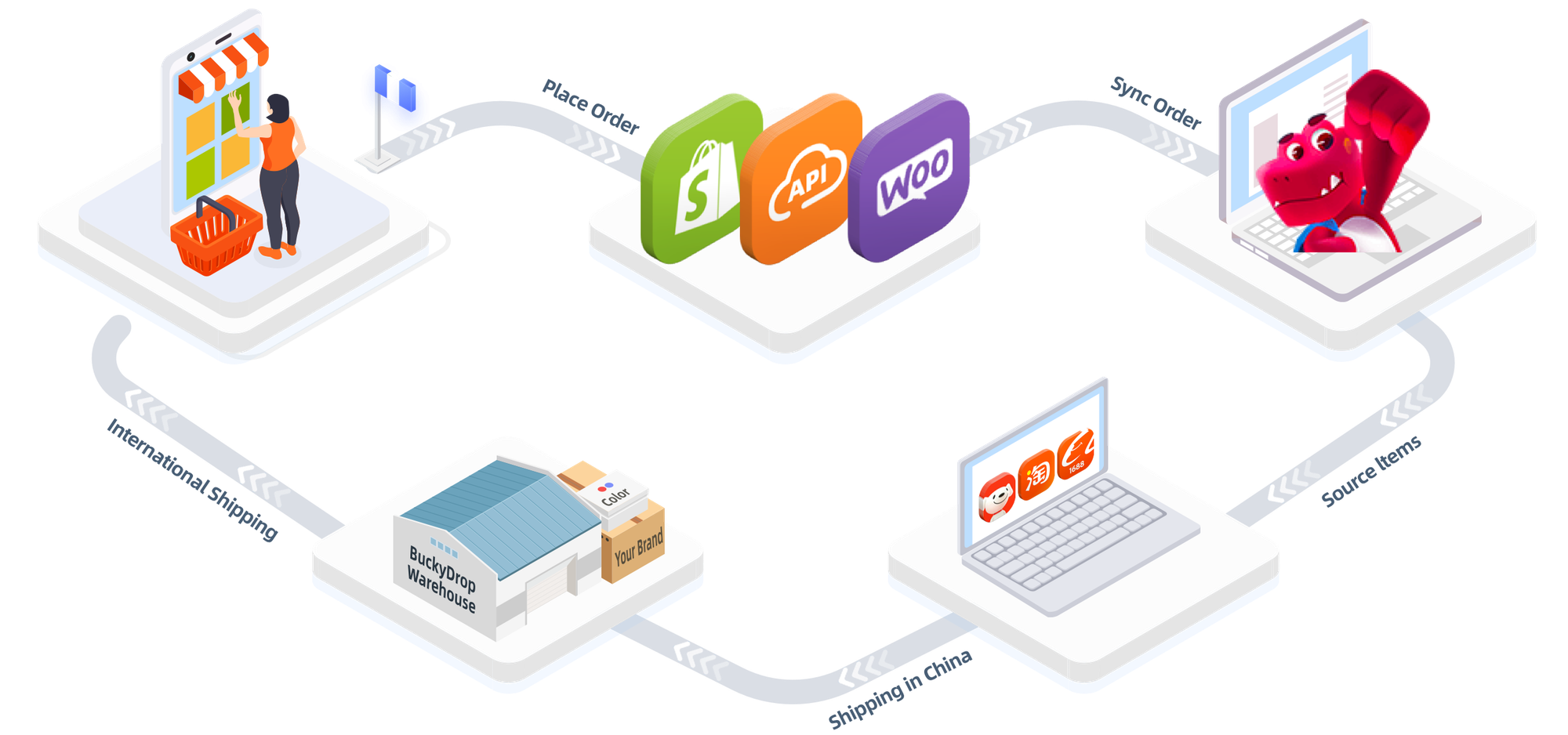
Shopify, WooCommerce, and BigCommerce manage the storefront and customer order record. BuckyDrop is positioned in a different layer: sourcing, product processing, fulfillment, branding services, and international shipping for China-based supply-chain workflows.
According to BuckyDrop’s public workflow documentation, Shopify and WooCommerce orders can be synchronized to its administration system, followed by sourcing, quality checks, optional value-added services, package processing, shipping, and tracking updates. Its public beginner guide also documents store connection, product pushing, source linking, and order fulfillment for Shopify and WooCommerce. These are company-stated capabilities and should be tested against the merchant’s actual catalog and destination markets before scaling.
BuckyDrop also has a public Shopify App Store listing and a BuckyDrop plugin listing for WooCommerce on WordPress.org. The listings support the existence of those connection options but do not guarantee compatibility with every theme, extension, supplier, product category, or custom checkout.
For a Shopify implementation, this guide covers one common Shopify dropship workflow. WooCommerce sellers can review supplier and plugin considerations for dropshipping with WooCommerce.
For BigCommerce, merchants should treat BuckyDrop connectivity as an API or custom-integration question unless current official documentation confirms a native connector. Verify required fields, authentication, update frequency, error handling, and implementation ownership before committing.
Who BuckyDrop May Fit
BuckyDrop may be relevant to:
· Shopify or WooCommerce sellers sourcing from Chinese marketplaces
· Teams that need sourcing and fulfillment activities connected to their store
· Merchants evaluating quality checks, product processing, custom packaging, or branding services
· Sellers prepared to validate shipping routes, landed cost, tracking return, and exception handling
North American Operating Requirements
A North American store should test what happens after a shipping label is created. Does the parcel receive a first carrier scan from USPS, UPS, FedEx, or Canada Post, or does tracking remain in a pre-shipment state while customer support receives “Where is my order?” tickets?
The storefront should help staff identify:
· Whether the supplier accepted the order
· Whether inventory was confirmed
· Which carrier has the parcel
· Whether the first carrier scan occurred
· Whether the shipment was split
· Who owns the next action
U.S. merchants should have a reasonable basis for advertised shipping times. Under the FTC’s Mail, Internet, or Telephone Order Merchandise Rule, sellers that cannot ship within the promised period must address the delay and the buyer’s refund or consent rights. Review the FTC shipping-promise rule. This article is not legal advice, and Canadian merchants should separately verify federal and provincial tax, consumer, duty, and shipping obligations.
Before Q4 or Black Friday/Cyber Monday, test supplier cutoff dates, carrier handoff, first-scan visibility, inventory-update delays, and the support workflow for late deliveries. Increasing Meta or TikTok ad spend before these processes are stable can increase refund pressure and support workload along with order volume.
Who Should Choose Shopify?

Put Shopify first on the test list when:
· No one on the team wants to manage hosting or WordPress updates
· The supplier has a maintained Shopify app
· The store needs to launch with a standard theme and checkout
· The team values a consolidated SaaS administration environment
Shopify may be a weaker fit when the business requires extensive backend customization, depends on unsupported suppliers, or cannot justify the recurring cost of its required app stack.
Who Should Choose WooCommerce?
Put WooCommerce first when:
· The business already operates WordPress reliably
· Content and SEO flexibility are central to the acquisition model
· The team needs custom supplier, pricing, or product-data logic
· A developer or technical partner can manage updates and failures
WooCommerce may be a poor fit for a founder who expects one vendor to own hosting, backups, security, extension compatibility, and recovery.
Who Should Choose BigCommerce?
Test BigCommerce when:
· The business wants hosted infrastructure
· The catalog, channels, or operational requirements need a more detailed plan-level review
· The team wants to determine whether current plan features replace selected apps
· The merchant can forecast GMV and payment-provider usage accurately
It may be a weaker fit when the GMV thresholds create an unattractive upgrade path, an Open Payment Provider Fee materially changes unit economics, or a required supplier connection needs custom work.
Switching Considerations
Moving platforms affects more than the storefront design. Audit:
· Products and variants
· Customer records
· Historical orders
· Reviews and subscriptions
· Discounts and gift cards
· Blog content
· Analytics and pixels
· App data
· Tax and payment settings
· URLs and redirects
· Staff procedures
Google recommends preparing a URL map, testing the new site, using redirects from old URLs to their relevant new destinations, updating internal links, and monitoring the migration. Search visibility can fluctuate temporarily while changed URLs are recrawled and processed. Review Google’s site-migration guidance before changing domains or URL structures.
Avoid changing the platform, domain, site architecture, analytics implementation, and checkout logic in one uncontrolled release. When several systems change at once, diagnosing lost orders, broken tracking, or organic-traffic changes becomes harder.
What to Verify Before You Commit
Test | What to verify |
Store connection | The documented connector supports your platform and current store configuration |
SKU mapping | Store SKU, supplier SKU, option, image, and cost stay correctly linked |
Inventory | Stock changes reach the storefront before additional orders are accepted |
Order sync | Paid orders reach the correct supplier without manual copying |
Tracking return | Carrier and tracking data return to the correct store order |
Exceptions | Failed syncs, stockouts, and rejected orders enter a visible queue |
Payments | Gateway eligibility, processing cost, platform fees, and settlement |
Refunds | Full, partial, pre-fulfillment, and post-fulfillment refund handling |
Shipping | Available routes, destination restrictions, landed cost, and first-scan visibility |
Support boundary | Which company owns a platform, app, supplier, package, or tracking failure |
Exit path | Products, customers, orders, content, and operational data can be exported |
Common Platform-Selection Mistakes
The most expensive errors usually happen before the first ad campaign:
· Choosing the storefront before checking supplier compatibility
· Comparing subscriptions while ignoring apps and labor
· Assuming “automatic” means every exception is handled
· Treating a marketplace listing as proof of technical compatibility
· Installing several overlapping apps without defining data ownership
· Skipping cancellations, refunds, and stockout tests
· Promising delivery dates the supplier workflow has not demonstrated
· Migrating without a URL and data plan
Final Recommendation and CTA
For a nontechnical founder with a supported supplier app, Shopify is a reasonable first test. For a WordPress operator with dependable technical support, WooCommerce may provide more control. For a merchant seeking hosted infrastructure with different plan economics, BigCommerce deserves a structured evaluation.
The Shopify vs WooCommerce vs BigCommerce for dropshipping decision should be made with real orders, not a feature table alone.
Choosing the storefront also does not prove that the sourcing and fulfillment workflow will work. Review BuckyDrop’s all in one dropshipping platform, then verify whether its documented Shopify, WooCommerce, or API options match your store, suppliers, products, and destination markets.
Start with 10 to 20 controlled orders. Measure:
· Manual minutes per order
· Time from payment to supplier acceptance
· Tracking return to the store
· Fulfillment exceptions requiring staff intervention
· Customer support workload
· Real cost per fulfilled order
Expand only when the workflow performs acceptably under normal orders and failed-order conditions.
Frequently Asked Questions
Which platform is cheapest for dropshipping?

There is no reliable universal answer. Shopify and BigCommerce charge platform subscriptions, while WooCommerce requires hosting and may require paid extensions or developer support. Compare platform fees, apps, payment costs, maintenance, fulfillment charges, and labor. Pricing may vary.
Which platform is easiest for a beginner?

For a founder without technical support, Shopify may require less infrastructure management when the supplier already has a maintained Shopify integration. A simple setup can still become complicated when several apps control inventory, orders, tracking, and returns.
Does WooCommerce require a developer?
Not for every store. Managed hosting and established extensions may be enough for a straightforward implementation. Technical support becomes more important when the store requires custom supplier logic, performance work, complex checkout rules, or plugin-conflict resolution.
Can one supplier work with Shopify, WooCommerce, and BigCommerce?
Possibly, but connection depth may differ. One platform may have a maintained app, another may depend on CSV files or email, and another may require API development. Verify each platform separately with the supplier and integration provider.
Does BuckyDrop replace Shopify or WooCommerce?

No. Shopify and WooCommerce operate the storefront and customer checkout. BuckyDrop positions its service around sourcing, processing, fulfillment, branding, and shipping workflows connected to supported stores.
Does BuckyDrop support BigCommerce?
The public BuckyDrop materials reviewed for this article document Shopify and WooCommerce store connections and also refer to API integrations. A native BigCommerce connector was not confirmed in the reviewed materials. Verify the current API and implementation options directly with BuckyDrop before planning a BigCommerce rollout.
Are dropshipping apps included in platform prices?
Often they are not. Sourcing, inventory, fulfillment, tracking, returns, email, reviews, and support tools may carry separate subscriptions or usage charges. Verify the entire software stack before scaling.
What should I test before committing?
Run normal orders and failure cases: stockout, SKU mismatch, address correction, cancellation, partial refund, split shipment, and missing tracking. Record manual work and identify who owns each exception.
Will changing platforms hurt SEO?
A migration may create indexing, redirect, reporting, or traffic problems if it is poorly managed. Google recommends URL mapping, redirects, updated internal links, testing, and ongoing monitoring. Temporary visibility fluctuations may occur during recrawling and reprocessing.
Sources
2. Shopify Fulfillment Options and Dropshipping Services
6. BigCommerce 2026 Pricing Update
9. BuckyDrop Shopify App Store Listing
10. BuckyDrop WooCommerce Plugin