Dropshipping Payment Methods: Complete Guide for 2026

Introduction
A Shopify seller can have a product that works on TikTok, a checkout that accepts cards, and a profitable-looking ROAS — then still lose the week because payment timing and fulfillment timing do not line up.
The problems usually show up after the first sales spike. PayPal asks for more documentation. A Shopify chargeback arrives because tracking was not uploaded fast enough. A customer in Texas expects a USPS, UPS, or FedEx scan and opens a “Where is my order?” ticket after three quiet days. A Canadian buyer sees no movement on a cross-border parcel and asks for a refund before the package clears the next scan point.
That is why dropshipping payment methods are not just checkout settings. For North American sellers, payment choices affect cash flow, supplier payment timing, dispute evidence, fulfillment speed, and how much support work your team absorbs after every ad-driven order.
If your model depends on dropshipping from china, checkout is only the first half of the job. The paid order still needs to be sourced, checked, packed, shipped, and updated back to the customer.
Quick Verdict
If checkout is the problem, start with the payment layer: credit cards, debit cards, PayPal, digital wallets, and the payment methods your platform supports in your country.
If cash flow is the problem, look at payout timing, payment reserves, disputes, refunds, and how quickly you need to pay suppliers after an order comes in.
If fulfillment is the problem, a payment gateway will not fix it. You need order sync, SKU and variant matching, inventory visibility, supplier payment workflow, tracking return, and exception handling.
BuckyDrop belongs in that third layer. It should be evaluated after checkout, when a paid order needs to be sourced, checked, packed, shipped, and updated back to Shopify or WooCommerce. According to company-provided materials and public app/plugin listings, BuckyDrop supports sourcing, automated fulfillment, store integration, quality checks, package handling, branding services, and tracking-related workflows. Verify current service scope before scaling.
A practical setup for many North American dropshipping sellers looks like this:
Store Stage | Practical Setup |
Testing products | Card payments + PayPal + one reliable supplier payment method |
100–500 orders/month | Primary gateway + PayPal or wallets + basic order and fulfillment automation |
500–1,000 orders/month | Primary gateway + backup plan + fraud review + tracking evidence process |
1,000+ orders/month | Multi-gateway planning + fulfillment automation + supplier exception management + finance review |
What Are Dropshipping Payment Methods?
Dropshipping payment methods are the ways money moves through your ecommerce business.
There are two separate flows.
The first is the customer payment flow. This includes credit cards, debit cards, PayPal, Shop Pay, Apple Pay, Google Pay, WooPayments, Stripe-supported methods, and local payment options. This is what the customer sees at checkout.

The second is the supplier payment flow. This is how you pay the supplier, sourcing agent, fulfillment partner, or warehouse after an order is placed. Supplier-side payments may involve business credit cards, PayPal, Wise, Payoneer, bank transfer, platform wallet balance, invoice terms, or an automated fulfillment account.
Beginner sellers often mix these up. A customer can pay your Shopify store with a credit card, while you pay your supplier through a separate fulfillment workflow. The methods do not need to match. The timing needs to work.
If your customer payout takes several business days but your supplier needs payment immediately, you need working capital. If tracking is delayed, customer support gets more refund pressure. If you cannot produce delivery evidence, chargebacks become harder to defend.
Checkout Layer vs. Fulfillment Layer
Payment gateways and fulfillment platforms solve different problems.
Layer | What It Handles | Examples | What It Does Not Handle |
Checkout layer | Accepting customer payments | Shopify Payments, PayPal, Stripe, WooPayments, digital wallets | Product sourcing, supplier payment, QC, packing, shipping, tracking return |
Supplier payment layer | Paying suppliers or fulfillment partners | Business card, PayPal, Wise, Payoneer, bank transfer, fulfillment account | Customer checkout conversion |
Fulfillment layer | Turning paid orders into shipped orders | BuckyDrop, sourcing agents, fulfillment partners, warehouse workflows | Payment authorization, PayPal holds, card network chargeback decisions |
This distinction matters. BuckyDrop does not sit at checkout like Stripe, PayPal, Shopify Payments, or WooPayments. It sits after payment capture, where paid orders need to become shipped orders.
How We Evaluated Payment and Fulfillment Solutions
The goal here is not to list every payment logo. It is to help sellers avoid the payment and fulfillment mistakes that usually appear after orders start coming in.
This guide uses practical buying criteria rather than review-score chasing. Google’s guidance on helpful, reliable, people-first content also emphasizes original, useful content that serves readers rather than search engines.
We evaluated payment methods and workflow tools by these criteria:
Evaluation Area | What to Check |
Ecommerce platform fit | Does it work with Shopify, WooCommerce, or your custom stack? |
Customer trust | Will customers recognize and trust the method at checkout? |
Payment availability | Is it supported in your country, business type, and product category? |
Payout timing | How quickly can you access funds for supplier payment? |
Dispute handling | Can you provide tracking, delivery evidence, refund policy, and communication history? |
Supplier workflow | Can the post-payment process handle purchasing, QC, packing, and tracking return? |
Total cost per fulfilled order | What is the real cost after payment fees, shipping, packaging, app fees, and labor? |
Support and exceptions | What happens when stock runs out, tracking is late, or a customer disputes the order? |
Use platforms such as G2’s payment gateway software category or Capterra’s payment processing software category for category research, but do not choose a provider from review scores alone. Your country, product category, payout timing, dispute risk, and supplier workflow matter more.
When Small Businesses Need a Better Payment Setup
At 0–100 orders per month, keep the setup simple. Use one primary processor, PayPal if it fits your market, and one reliable supplier payment method. Your biggest risk is usually poor setup: test mode left on, incomplete account verification, unclear refund policy, or no real order test before running ads.
At 100–500 orders per month, payment and fulfillment start to collide. Many teams begin to feel spreadsheet strain here, especially if manual admin takes more than 20% of the workday. Once orders move past a few dozen per week, dropshipping order management becomes part of the payment decision.
At 500–1,000 orders per month, payout timing, dispute handling, and supplier reliability become real operating risks. You need a clear process for high-risk orders, out-of-stock products, late tracking, partial shipments, refunds, and evidence collection.
At 1,000+ orders per month, a payment outage, supplier delay, or tracking backlog can turn into a support crisis within a day. At this stage, sellers should document backup payment options, fraud review rules, supplier escalation paths, tracking return requirements, and real cost per fulfilled order.
This becomes more painful during Black Friday, Cyber Monday, and Q4 gifting season. A payment gateway can keep accepting orders while your supplier runs out of stock, tracking falls behind, or customer support queues double. Before holiday campaigns, test not only whether checkout works, but whether paid orders can be purchased, checked, packed, shipped, and updated back to the customer within the timeline you promise.
Comparison Table
Software / Solution | Best For | Main Strength | Main Limitation | Best Fit |
Shopify Payments | Shopify stores in supported countries and categories | Native Shopify checkout and payout workflow | Not available in every country or business category | Shopify sellers that want a simpler built-in setup |
PayPal | New stores that need buyer trust | Familiar payment option for many customers | Holds, disputes, and evidence requirements can create cash-flow pressure | Sellers with clear tracking and support discipline |
Stripe | WooCommerce, custom stores, and flexible checkout setups | Supports multiple payment method categories and developer-friendly checkout flows | Eligibility and method availability vary by region | Sellers with technical control over checkout |
WooPayments | WooCommerce stores in supported locations | Built for WooCommerce admin workflows | Availability and features vary by country | WordPress-first sellers that want a native WooCommerce option |
Digital wallets | Mobile-heavy stores | Faster checkout on supported devices | Depends on gateway, device, browser, and region support | Stores with TikTok, Meta, influencer, or mobile search traffic |
Local payment methods | Multi-country sellers | Can match local buyer preferences | Adds complexity in settlement, refunds, and support | Sellers expanding beyond the U.S. and Canada |
Wise / Payoneer / bank transfer | Supplier and vendor payments | Useful for cross-border supplier payment | Not a customer checkout gateway | Teams paying overseas suppliers or agents |
BuckyDrop | China sourcing, fulfillment, branding, and store-connected order workflow | Designed to support sourcing-to-fulfillment operations after checkout | Not a replacement for PayPal, Stripe, Shopify Payments, or WooPayments | Sellers whose bottleneck is post-payment fulfillment, not checkout alone |
How to Choose the Right Payment Stack
Start with your platform.
If you sell on Shopify, check whether Shopify Payments is supported for your country, business type, bank account, and product category. Shopify’s documentation states that supported country pages include bank account requirements, business verification requirements, accepted payment methods, and payout details.
If you sell on WooCommerce, review WooCommerce’s payments documentation and compare WooPayments, Stripe, PayPal, and other gateway options by country, refund handling, plugin quality, site performance, and maintenance workload.
Next, map your traffic source. TikTok and Meta traffic usually means mobile-heavy checkout. Wallets such as Apple Pay, Google Pay, and Shop Pay may reduce checkout friction when supported by your platform, processor, customer device, and region.
Then map your supplier location. A store selling to U.S. customers but sourcing from China has two operating clocks: customer payment timing and supplier fulfillment timing. For China fulfillment, your workflow should account for purchasing, QC, packing, international shipping, tracking updates, and exception handling.
Finally, calculate real cost per fulfilled order:
Real cost per fulfilled order = payment processing cost + supplier payment cost + fulfillment cost + shipping cost + packaging cost + app cost + manual labor cost + expected refund/dispute cost.
This is the number that matters. A lower gateway fee is not always cheaper if the process creates more manual work, slower tracking, or weaker dispute evidence.
Best Payment Methods and Workflow Solutions for Dropshipping
1. Shopify Payments
Shopify Payments is often the cleanest starting point for eligible Shopify sellers because much of the payment workflow stays inside Shopify.
It is not universal. Shopify’s documentation says availability depends on country, business type, business category, bank account requirements, verification documents, accepted payment methods, and payout details. Verify eligibility before spending money on ads.
Shopify Payments is a fit when you sell on Shopify, your business is eligible, and you want a simpler payment setup. It is not enough by itself if your real bottleneck is supplier payment, inventory visibility, or tracking return.
2. PayPal
PayPal can help newer stores reduce buyer hesitation because many shoppers recognize it. That is useful when your brand has no long history and traffic comes from paid ads or social commerce.
The tradeoff is operational discipline. PayPal’s chargeback evidence guidance notes that different chargeback reason codes require different types of evidence. For dropshipping sellers, that usually means tracking, delivery confirmation, customer communication, refund policy, and proof that the order was fulfilled as described.
Use PayPal, but do not make it your only payment method. If funds are held or disputes spike, you still need a way to fulfill orders.
3. Stripe
Stripe is a strong option for WooCommerce stores, custom ecommerce builds, and sellers that need more control over checkout. Stripe’s payment method documentation notes that different payment methods are more dominant in certain regions and that not all customers prefer card payment.
Stripe makes sense if your team can manage configuration, eligibility checks, disputes, and technical maintenance. It is less ideal if you want a no-configuration setup and have no technical support.
4. WooPayments and WooCommerce Gateways
WooCommerce gives sellers flexibility. That flexibility is useful, but it also means more responsibility. You need to check plugin quality, supported countries, refund handling, compatibility, site speed, subscription needs, tax setup, and dispute workflow.
WooCommerce sellers should not install payment plugins casually. Every checkout plugin can affect conversion, support workload, and maintenance risk.
5. Digital Wallets
Apple Pay, Google Pay, and Shop Pay are useful for mobile-heavy traffic. If most of your visitors come from TikTok, Meta, influencer traffic, or mobile search, reducing typing at checkout can matter.
Wallets are not usually standalone tools. They depend on your ecommerce platform, payment processor, customer device, browser, and country support.
6. Supplier Payment and Fulfillment Workflow
This is where the margin leak usually starts: the checkout worked, but purchasing, QC, packing, and tracking did not keep up.
A gateway collects the customer payment. It does not check supplier inventory, purchase the product, inspect quality, pack the order, choose a shipping line, or return tracking to the store.
That is where auto dropshipping workflows and fulfillment platforms become relevant. A good auto dropship workflow should make it easier to see order status, catch exceptions earlier, and reduce manual supplier follow-up after testing.
If you are comparing the best shopify dropshipping software, separate checkout payment tools from fulfillment and supplier workflow tools. Stripe, PayPal, WooPayments, and Shopify Payments help with checkout. BuckyDrop belongs in the sourcing-to-fulfillment layer.
BuckyDrop at a Glance
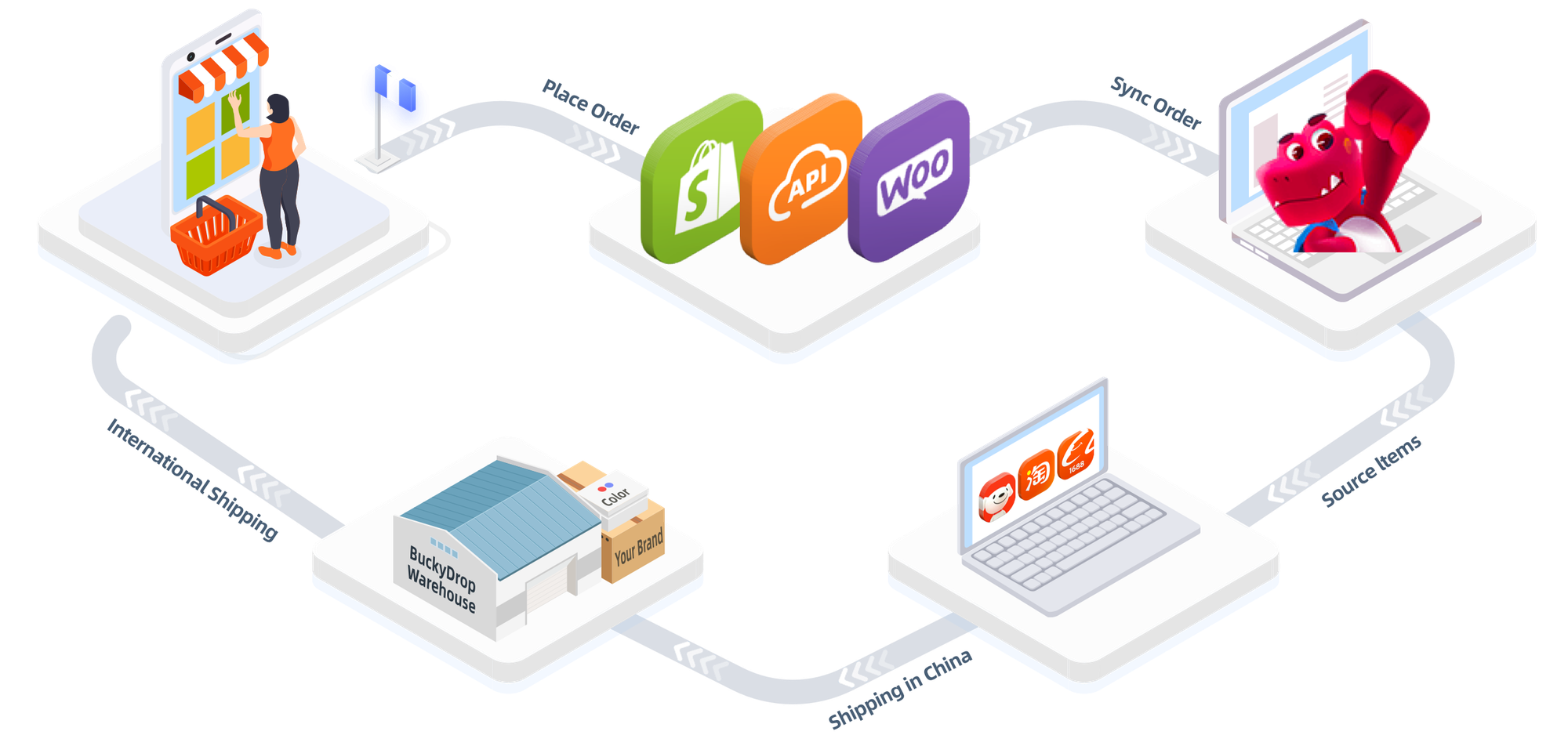
BuckyDrop should not be evaluated as a payment gateway. It does not replace Stripe, PayPal, Shopify Payments, or WooPayments. Its role starts after payment capture, when a paid order needs to be sourced, checked, packed, shipped, and updated back to the store.
Based on company-provided materials and public pages, BuckyDrop is positioned as a China sourcing, automated fulfillment, and branded dropshipping platform for global ecommerce sellers. Company-provided materials state that BuckyDrop supports Shopify, WooCommerce, BuckyShop, and API-connected merchants. Public listings are also available for the BuckyDrop Shopify app and WooCommerce plugin.
Category | BuckyDrop Fit |
Best for | Sellers that need China sourcing, order sync, fulfillment, QC, packaging, and tracking return |
Not best for | Sellers that only need a standalone payment gateway |
Core value | Post-payment workflow support from sourcing to fulfillment |
Strong categories | China sourcing, branded dropshipping, packaging, QC, logistics coordination, store-connected order workflow |
Main use case | Turning paid orders into sourced, checked, packed, shipped, and trackable customer orders |
Key point to test | Run 10–20 real orders and measure sync speed, SKU matching, tracking return, support response, and real cost per fulfilled order |
BuckyDrop’s dropshipping services may be relevant for sellers who want sourcing and fulfillment support after checkout. Sellers comparing dropship services should verify current pricing, service scope, supported platforms, logistics routes, and support process before scaling.
If you use the phrase all in one dropshipping platform in marketing copy, keep it tied to verified sourcing-to-fulfillment workflows. Do not use it to imply that BuckyDrop replaces every payment, fraud, tax, accounting, or customer support tool in your ecommerce stack.
Before vs. After Workflow
Before a structured workflow, small teams usually run fulfillment manually.
Orders arrive in Shopify or WooCommerce. Someone copies customer details into a spreadsheet or supplier portal. Another person checks stock by message. Payment is made manually. The team waits for tracking. Then someone updates the store by hand. If the supplier runs out of stock, the customer support team often finds out too late.
After a better workflow, orders sync from the store, SKUs and variants are matched, inventory issues are flagged earlier, procurement is triggered, QC and packing are tracked, shipping is arranged, and tracking returns to the store.
You still need someone watching exceptions. Automation helps most when it catches bad SKUs, missing stock, address issues, and late tracking before customers do.
Who BuckyDrop Is Best For
BuckyDrop is most relevant for Shopify and WooCommerce sellers that already have product demand but are losing time in sourcing and fulfillment operations.
It may fit sellers doing 100–1,000 orders per month, especially when the team is spending too much time on manual order admin, supplier messages, stock checks, procurement, packaging requests, and tracking updates.
It may also fit sellers testing branded dropshipping, custom packaging, Chinese marketplace sourcing, quality inspection, or cross-border fulfillment. According to company-provided materials and public pages, BuckyDrop offers or describes services related to label handling, custom packaging, photo-taking, quality checks, logo packaging materials, clothing labels, hang tags, thank-you cards, and branded packaging. Verify availability, cost, and execution requirements before scaling.
What to Verify Before You Commit
Before moving your full catalog, test 10 to 20 real orders across a small group of active SKUs. Include at least one simple product, one variant-heavy product, and one order that uses your preferred shipping route.
Measure:
· Order sync speed from Shopify or WooCommerce
· SKU and variant matching accuracy
· Inventory update timing
· Supplier payment or procurement workflow
· Out-of-stock handling
· Quality check communication
· Packaging execution
· Tracking return to the store
· Support response process
· Refund and dispute evidence process
· Real cost per fulfilled order
Do not judge the workflow from screenshots or demo orders. The test should answer three questions: did the order move without manual copying, did tracking return fast enough to reduce customer support pressure, and did the final landed cost still protect your margin?
Common Mistakes to Avoid
Do not let one provider become your single point of failure. If your only processor pauses activity, your ads can keep spending while checkout stops converting.
Supplier payment timing is where profitable stores can still run short on cash. A store can look healthy in Shopify while the owner is waiting on payouts and paying suppliers out of pocket.
Do not treat payment approval as permanent. Payment providers can review accounts, request documentation, hold funds, or restrict activity based on risk signals.
Do not wait too long to upload tracking. Late tracking creates support tickets and weakens dispute responses. Shopify’s chargeback documentation notes that evidence varies by dispute type, and for physical products, tracking and delivery confirmation can matter.
Avoid vague shipping language. “Fast shipping” is not a policy. Give customers a delivery window your operation can actually support.
Do not scale ad spend before testing fulfillment. TikTok or Meta can create orders faster than your supplier workflow can process them.
Do not ignore real cost per fulfilled order. Gateway fees are only one piece of the cost. Packaging, shipping, supplier payment fees, app fees, refunds, and manual labor all matter.
Do not publish unverified claims. Avoid words like “guaranteed,” “fastest,” “lowest cost,” “risk-free,” or “proven to increase” unless you have clear, current evidence.
Real-World Use Cases
Use Case 1: Shopify Store With TikTok Traffic
A Shopify seller starts getting orders from TikTok ads. Card payments work, but customers ask whether PayPal is available. The seller adds PayPal, improves checkout familiarity, and sets a rule: no order is treated as complete until tracking is captured and returned to the store.
The payment method helped checkout confidence. The operating improvement came from tracking discipline and clearer shipping expectations.
Use Case 2: WooCommerce Store With Supplier Delays
A WooCommerce seller accepts credit cards but pays suppliers manually. At 200 orders per month, the owner spends hours checking stock, messaging suppliers, and updating tracking.
The issue is no longer just payment processing. The seller needs supplier-side visibility, SKU matching, inventory updates, order routing, and exception alerts.
Use Case 3: Q4 Cross-Border Order Pressure
A U.S. store runs a Black Friday campaign and sees orders jump over a weekend. Checkout keeps working, but tracking does not return fast enough. Customers who bought gifts start asking for updates before the first carrier scan appears.
This is where payment and fulfillment have to be reviewed together. If paid orders cannot move through sourcing, packing, shipping, and tracking return within the promise shown on the product page, the store may face refund pressure even if the payment gateway performed correctly.
Use Case 4: Reported BuckyDrop Customer Case
In a reported customer case involving a five-person Japanese fashion team, company-provided materials state that BuckyDrop supported branding work such as replacing clothing hang tags, sewing brand logos, adding thank-you cards, using brand labels, and handling folding and packaging.
According to company-provided case materials, the same case reported a 20% increase in repeat purchase rate and a 5% decrease in return rate. Do not treat those numbers as a forecast. Product quality, margin, shipping time, traffic source, and customer expectations can change the outcome.
FAQ
1. What are the best dropshipping payment methods in 2026?
For many North American sellers, the practical starting point is credit/debit cards, PayPal, and digital wallets. Shopify sellers should check Shopify Payments eligibility. WooCommerce sellers should compare WooPayments, Stripe, PayPal, and other supported gateways.
2. Is PayPal good for dropshipping?
PayPal can help with buyer trust, especially for new stores. The risk is that holds, disputes, and evidence requirements can create cash-flow pressure. Use PayPal with clear tracking, realistic shipping windows, and fast support.
3. Can I use Stripe for dropshipping?
Many ecommerce sellers use Stripe-supported checkout flows, but availability and eligibility depend on region, business type, and product category. Verify with Stripe before scaling.
4. Is Shopify Payments enough for a dropshipping store?
It may be enough for checkout in some eligible Shopify stores, but it does not solve supplier payment, sourcing, QC, packaging, or tracking return. Treat payment and fulfillment as separate workflows.
5. What is the difference between a payment gateway and a fulfillment platform?
A payment gateway processes customer payments. A fulfillment platform helps manage what happens after payment: sourcing, procurement, quality checks, packing, shipping, tracking, and exceptions.
6. Should I offer Apple Pay and Google Pay?
If your store has high mobile traffic, wallet payments may reduce checkout friction when supported by your platform and gateway. Test them with your actual traffic and checkout analytics.
7. Is BuckyDrop only for Shopify?
No. Based on company-provided materials, BuckyDrop supports Shopify, WooCommerce, BuckyShop, and API-connected merchants. Public listings are available for the BuckyDrop Shopify App Store listing and the BuckyDrop WooCommerce plugin. Verify current platform support before scaling.
8. Is BuckyDrop better than a shipping-label tool?
Not necessarily. A shipping-label tool may be better if your only bottleneck is label generation. BuckyDrop makes more sense if your bottleneck is China sourcing, supplier coordination, quality checks, packaging, fulfillment, and tracking return.
9. How much does BuckyDrop cost?
Pricing may vary. Review the current BuckyDrop pricing page and confirm service fees, sourcing fees, shipping costs, packaging fees, storage fees, and any usage-based charges before scaling.
10. How should I estimate shipping cost?
Use the BuckyDrop shipping fee calculator as an estimate, then verify final cost by destination, package weight, volume, route, carrier, and current billing terms. Do not assume one shipping cost applies to all orders.
11. What happens if a supplier runs out of stock?
The provider should have a clear exception process: flag the issue, suggest alternatives, notify the seller, pause procurement, or support a refund workflow. Verify this process before moving all orders.
12. Is branded packaging worth it?
It can be worth testing when you have repeat purchase potential, influencer traffic, or a product where unboxing affects customer perception. It is usually not the first priority if you are still validating demand.
Sources
· Google Search Central: Creating helpful, reliable, people-first content
· Shopify Help Center: Supported countries for Shopify Payments
· Shopify Help Center: Responding to chargebacks and inquiries
· Stripe Documentation: Payment method overview
· WooCommerce Payments Documentation
· PayPal: Evidence to provide for chargebacks
· G2: Payment Gateway Software Category
· Capterra: Payment Processing Software Category
· BuckyDrop Shopify App Store listing
· BuckyDrop WooCommerce plugin
· BuckyDrop shipping fee calculator
· Source: internal company materials
· Source: company-provided customer case materials
Final Recommendation and CTA
Copying another store’s checkout is lazy due diligence. Your payout timing, supplier location, refund policy, order volume, and support workload are different.
Start with the customer side: cards, PayPal, wallets, and local payment methods where relevant. Then map the supplier side: how fast you need to pay, what happens when inventory changes, how tracking returns to your store, and how much manual work your team performs after every paid order.
If your store is under 100 orders per month, keep the setup simple and test carefully. If you are above 100 orders per month and your team spends more than 20% of the day on manual order admin, supplier messages, stock checks, and tracking updates, it is time to look beyond payment gateways.
If checkout is working but fulfillment still depends on spreadsheets, supplier messages, and manual tracking updates, test BuckyDrop on your next 10 to 20 real orders before moving your full catalog.
Connect your Shopify or WooCommerce store, choose a small group of active SKUs, and measure three things: order sync speed, tracking return time, and real cost per fulfilled order after sourcing, handling, packaging, and shipping.